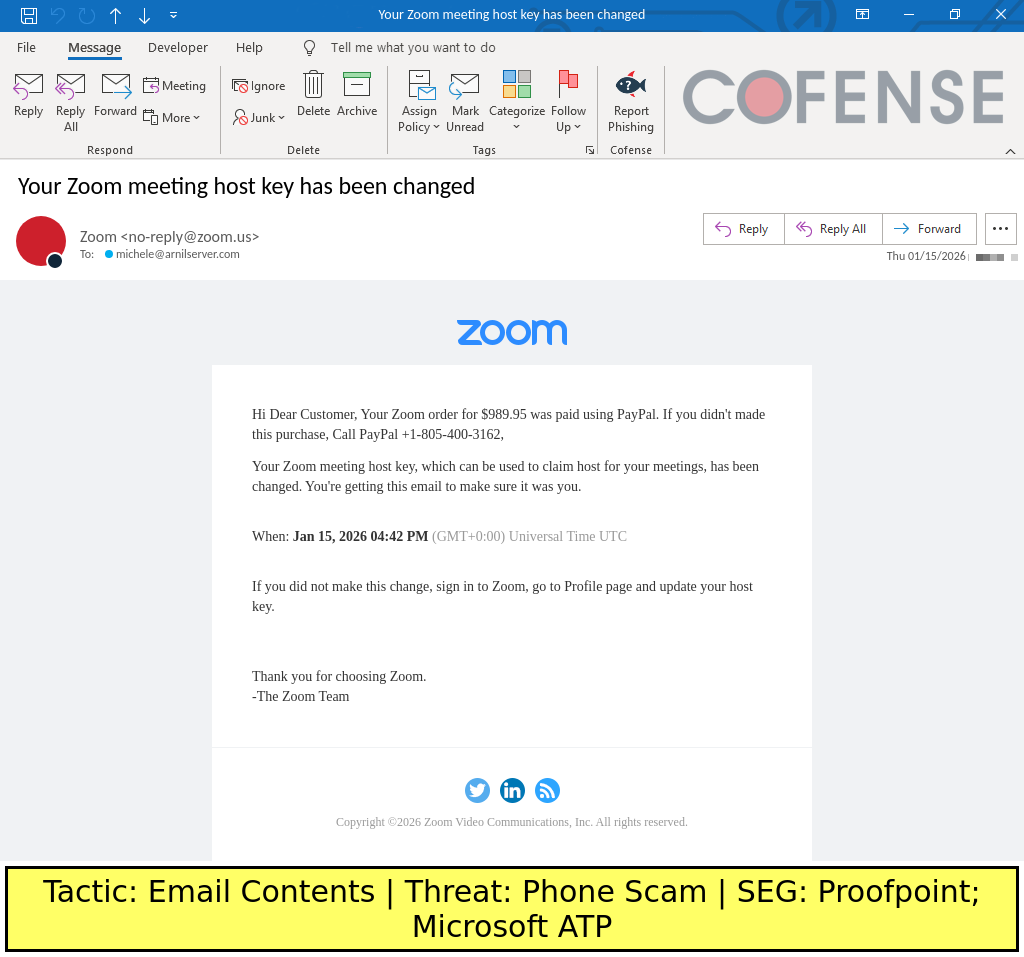
Threat actors register accounts on legitimate services and embed phone-scam text in document names, meeting descriptions, or account name fields to have legitimately-sent emails redirected and resent to victims without changing the visible From header. These redirected emails bypass SPF, DKIM, DMARC and many secure email gateways by using legitimate infrastructure like Exchange Online and services such as Zoom. #Zoom #ExchangeOnline
Keypoints
- Attackers create accounts on legitimate services and insert malicious phone-scam text into editable fields that will appear in outgoing emails (document names, meeting descriptions, account names).
- Legitimate business emails sent to addresses controlled by the threat actor are redirected to an Exchange Online mailbox, then resent to victims while preserving the original From header.
- The redirected emails include Resent-From and Resent-To headers showing the redirection, though many email clients hide these headers and Microsoft Outlook may display only the original To header.
- Because the emails are technically sent from legitimate infrastructure and retain original headers, they pass SPF, DKIM, and DMARC checks and have evaded secure email gateways like Proofpoint, Microsoft ATP, and Cisco IronPort.
- The email body often appears largely legitimate except for an inserted phone number or scam message, making human and automated detection difficult without careful inspection of content and headers.
- Defenses require visibility beyond header-based detection and reliance on human-reported intelligence and content inspection to identify suspicious phone numbers or unrelated text in otherwise legitimate messages.
MITRE Techniques
- [T1566.003 ] Spearphishing via Service – Using legitimate third-party services (e.g., Zoom) to deliver malicious content embedded in service-generated emails (‘Emails within this campaign use edited versions of legitimate business emails to deliver convincingly spoofed emails to recipients.’)
- [T1078 ] Valid Accounts – Creating and abusing valid accounts on legitimate services to place attacker-controlled text into fields that will be propagated in outgoing emails (‘The threat actor registers an account on a legitimate service and abuses a text field where they can input an arbitrary message (such as a document file name, online meeting event name/description, or user account name).’)
- [T1071.003 ] Application Layer Protocol: Mail Protocols (SMTP/Exchange) – Redirecting legitimate emails to an Exchange Online server controlled by the attacker, which then sends malicious emails to victims while preserving original From headers (‘The Exchange Online server sends the malicious emails to potential victims.’)
Indicators of Compromise
- [Email Address ] redirect/recipient context – michele[@]arnilserver[.]com (original recipient used by attacker), new_batch2[@]l873mye[.]onmicrosoft[.]com (attacker-controlled Exchange Online mailbox)
- [Domain ] sender/context – zoom[.]us (appears in From header of spoofed emails), onmicrosoft[.]com (Exchange Online tenant domain used by attacker)
- [Email Header ] redirection indicators – Resent-From, Resent-To headers shown in redirected messages (used to indicate the email was resent/redirected)
- [Account/Document Name ] embedded malicious text context – example account name or meeting description containing the phone-scam text such as “Dear Customer, Your Zoom order…” inserted into the account name/meeting/document field
- [Email Security Headers ] validation context – SPF, DKIM, DMARC results (these headers were present and passed, allowing the malicious messages to evade header-based filters)