Threat actors use layered evasion methods in phishing kits and email campaigns—embedding links in legitimate hosts, abusing open redirects and QR codes, applying geo/User-Agent/language filters, CAPTCHA or developer-tools detection, email/domain allowlists, password protection, and quick-deploy subdomains to delay detection and frustrate analysts. Defenders should combine manual analyst techniques (User-Agent/VPN spoofing, targeted mailbox checks) with tuned automated systems to detect suspicious subdomains and adapt to evolving offensive AI-driven defenses. #GeoJS #Mispadu
Keypoints
- Threat actors embed or hide phishing links in legitimate services (DocuSign, Google Docs, Canva, Zoho) and abuse open redirects from high-profile platforms (Google, Bing, YouTube, TikTok) to evade SEG URL scanning.
- QR codes and attachments (PDFs, Office docs) are increasingly used to bypass SEGs and push victims to credential phishing pages or malware downloads like Mispadu.
- Credential phishing kits sold to attackers include defensive features such as geo-IP filtering, User-Agent and language checks, CAPTCHA/Cloudflare Turnstile gating, developer-tools detection, and email address/domain allowlists to block researchers and automated scanners.
- Kits and campaigns use password-protected archives/attachments and password-protected pages to prevent automated scanning by SEGs and browsers.
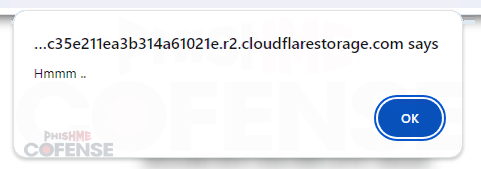
- Quick deploy hosting and single-use subdomains on platforms like workers.dev, glitch.me, pages.dev, blob.core.windows.net, netlify.app, r2.dev, and trycloudflare.com enable fast deployment and impede takedown and domain-aging detection.
- Some phishing pages perform backend IP/geo lookups (e.g., get.geojs.io) to detect VPNs or researcher locations and redirect non-target visitors to legitimate sites or show blank/not-found pages.
- Defenders should combine manual analyst actions (spoofing User-Agent, using targeted VPN endpoints, verifying inboxes) with tuning automated systems to flag suspicious quick-deploy subdomains and adapt to evolving adversary AI tools.
MITRE Techniques
- [T1078] Valid Accounts – Credential phishing pages collect valid user credentials by imitating legitimate login pages and forwarding entered credentials to external sources (“HTTP POSTS of entered credentials to external sources”).
- [T1598] Phishing – Use of embedded links, QR codes, and attachments (PDFs/Office docs) to trick users into submitting credentials or downloading malware (“QR codes can be either directly embedded in the email or in attached files such as PDFs or Microsoft Word documents”).
- [T1110] Brute Force (related mitigation avoidance) – Use of CAPTCHA/Cloudflare Turnstile and other gating to prevent automated analysis and bot access, effectively blocking automated credential stuffing or scanning (“Some CAPTCHAs have built-in detection of User-Agents, geo-ip, and other browser characteristics”).
- [T1222] File and Directory Permissions Modification (defense evasion) – Password-protecting archives, attachments, and pages to prevent automated scanning by SEGs and browsers (“password-protect downloaded archives…password-protect attached PDFs…password-protect the actual credential phishing pages”).
- [T1071] Application Layer Protocol (Web) – Abuse of legitimate web services and open redirects (Google AMP, SendGrid, YouTube, TikTok) to deliver or obfuscate links to phishing infrastructure (“use of open redirects using legitimate services such as Google AMP…SEGs do not scan the URLs that the services redirect to”).
- [T1204] User Execution – Reliance on user actions such as clicking embedded links, scanning QR codes, or opening attachments to initiate the phishing flow or malware delivery (“embedded QR codes…in attached files such as PDFs or Microsoft Word documents”).
- [T1583] Acquire Infrastructure – Use of quick deploy hosting and single-use subdomains on platforms like workers.dev, glitch.me, pages.dev, blob.core.windows.net, netlify.app, r2.dev, trycloudflare.com to rapidly provision malicious infrastructure and avoid takedown.
- [T1497] Virtualization/Sandbox Evasion (Developer Tools Detection) – Detection of developer tools and special User-Agents or languages to identify researchers or analysis environments and redirect or suspend page execution (“credential phishing kits now include detection methods that either redirect upon detection of developer tools or simply permanently suspend execution of the page”).
- [T1529] System Network Configuration Discovery (Geo/IP filtering) – Performing IP geolocation lookups (e.g., get.geojs.io) to determine visitor country, timezone, organization, or VPN use and restrict access accordingly (“hxxps://get.geojs.io/v1/ip/geo.json…used by the kit typically includes the IP address, the country, the time zone, and the organization”).
- [T1588] Compromise Infrastructure – Use of purchased phishing kits that include built-in defensive evasion features and capabilities to bypass MFA and mimic legitimate login pages (“kits…being indistinguishable from the legitimate login page, and being capable of bypassing multi-factor authentication”).
Indicators of Compromise
- [Domain/Subdomain] quick-deploy hosting abuse – examples: c1ient-indrctd1oadinn.distribute-employees-bonuses.workers[.]dev, mechalk-azure-primula.glitch[.]me, and other single-use subdomains on pages[.]dev, blob[.]core[.]windows[.]net, netlify[.]app (and additional malicious subdomains).
- [Service URL] Geo-IP lookup endpoint – hxxps://get[.]geojs[.]io/v1/ip/geo[.]json used by kits to fetch IP, country, timezone, and organization.
- [Malware] named malware – Mispadu referenced as delivered via password-protected PDFs and attachments (“attached PDF delivering Mispadu”).
- [Hosting Platforms] abused legitimate platforms – DocuSign, Google Docs, Canva, Zoho, Google AMP, Bing, YouTube, TikTok, SendGrid, Cloudflare (Turnstile) – used to host or redirect to phishing content.
- [File Types] attachment/file names – password-protected archives and PDFs used to bypass scanners (example context: password-protected attached PDF delivering Mispadu), and Office documents embedding QR codes.