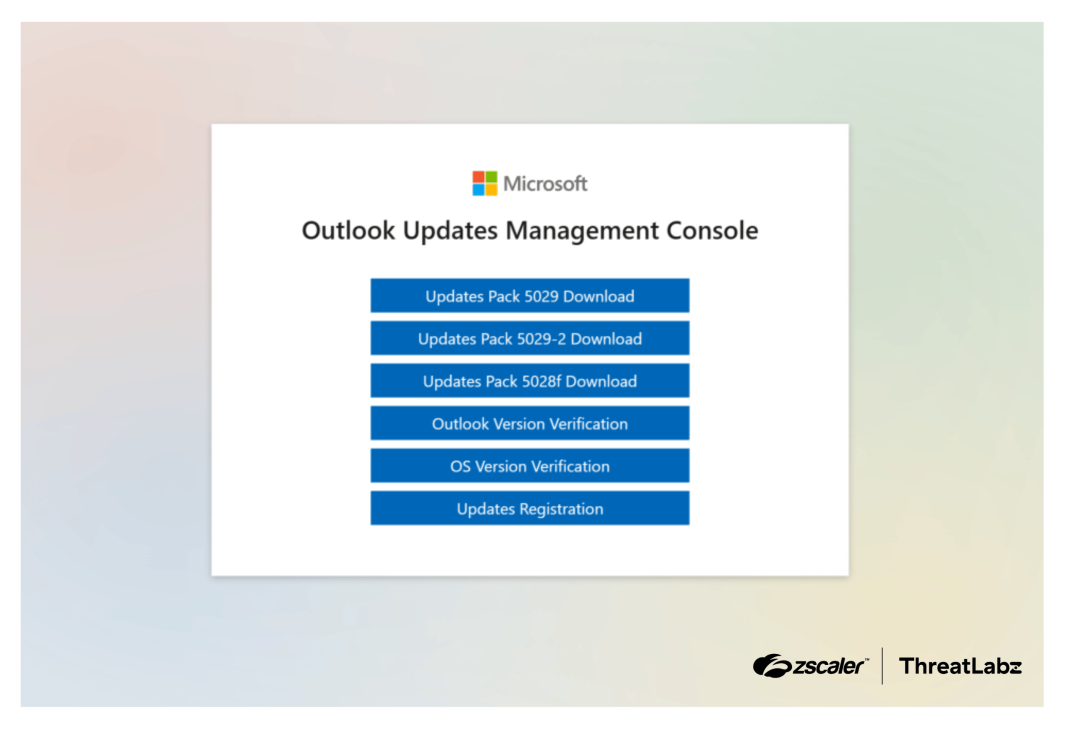
Zscaler ThreatLabz tracked Edgecution, a malicious Microsoft Edge extension used by an initial access broker tied to Payouts King ransomware to deliver a Python backdoor through Chrome native messaging. The campaign used fake Microsoft/Outlook update pages, social engineering via Microsoft Teams, and CloudFront-hosted C2 infrastructure to install the extension, evade detection, and execute commands on victim systems. #PayoutsKing #Edgecution #MicrosoftEdge #MicrosoftTeams #CloudFront
Keypoints
- The campaign is linked to an initial access broker associated with Payouts King ransomware.
- Attackers used social engineering in Microsoft Teams and fake Microsoft Outlook update pages to trick victims.
- Edgecution is a malicious Microsoft Edge extension that abuses the Chrome native messaging protocol to reach the host system.
- The attack chain includes a browser extension plus a Python backdoor that can collect system data, access files, and execute commands.
- The malware is designed to run in a headless Edge browser, making it invisible to users.
- C2 traffic was observed using CloudFront subdomains hosted on AWS.
- The setup scripts also used registry values, scheduled tasks, and encrypted ZIP content to deploy and hide the payloads.
MITRE Techniques
- [T1566.002 ] Phishing: Spearphishing Link – Victims were lured through Microsoft Teams messages and a fake Microsoft website to download or execute payloads (‘impersonate a company’s IT staff’ and ‘need a spam filter update’).
- [T1218.005 ] System Binary Proxy Execution: Mshta – The campaign used script-based delivery mechanisms including AutoHotKey, batch, and PowerShell to launch the malware (‘deploy the Edgecution malware’).
- [T1059.005 ] Command and Scripting Interpreter: Visual Basic – An AutoHotKey script was used in the infection chain to configure and deploy the malware (‘Downloads an obfuscated AutoHotKey script’).
- [T1059.003 ] Command and Scripting Interpreter: Windows Command Shell – Batch scripts were used to set up and deploy Edgecution and launch the browser (‘Windows batch script’).
- [T1059.001 ] Command and Scripting Interpreter: PowerShell – PowerShell scripts were used to set up deployment and execute commands (‘PowerShell script’).
- [T1112 ] Modify Registry – The setup wrote an AppKey value in the Windows registry to decrypt Python backdoor strings (‘set a value named AppKey in the Windows registry’).
- [T1053.005 ] Scheduled Task/Job: Scheduled Task – A scheduled task was created to launch Microsoft Edge automatically (‘schedule a task to launch Microsoft Edge’).
- [T1204.002 ] User Execution: Malicious File – The victim was induced to download and run malicious files from the fake update portal (‘Download’).
- [T1105 ] Ingress Tool Transfer – The campaign downloaded obfuscated scripts, encrypted ZIP files, and embedded Python to stage the payload (‘Downloads an obfuscated AutoHotKey script’ and ‘an encrypted ZIP file’).
- [T1132.001 ] Data Encoding: Standard Encoding – The malware used encrypted ZIP content and obfuscated data to evade signatures (‘encrypted ZIP file’ and ‘obfuscated’).
- [T1218.005 ] System Binary Proxy Execution: Mshta – The extension invoked native host execution through a batch file and Python launcher (‘invoked by the web browser extension’).
- [T1219 ] Remote Access Software – The malicious extension and Python host provided persistent remote command execution and system access (‘execute arbitrary code on the compromised host’).
- [T1059.006 ] Command and Scripting Interpreter: Python – The native host was a Python backdoor that processed C2 commands and executed code (‘Python-based backdoor’).
- [T1106 ] Native API – The malware abused Chrome native messaging to interact with host-native applications beyond the browser sandbox (‘abusing this interface’).
- [T1071.001 ] Application Layer Protocol: Web Protocols – The extension communicated with C2 over websockets (‘communicates with the C2 server over websockets’).
- [T1082 ] System Information Discovery – The Python backdoor collected and sent system information (‘collect and send system information’).
- [T1105 ] Ingress Tool Transfer – The backdoor wrote data and stored configuration files for C2 handling (‘Write data to a specific filename / path’ and ‘stores the C2 address in local storage’).
- [T1057 ] Process Discovery – The backdoor retrieved a list of running processes (‘Retrieve a list of running processes’).
- [T1059.001 ] Command and Scripting Interpreter: PowerShell – The Python backdoor could execute PowerShell commands and code (‘Execute PowerShell commands / code’).
Indicators of Compromise
- [Domains/URLs ] Edgecution C2 over WebSocket – wss://d3nh8sl98s2554.cloudfront[.]net/ws, wss://d2g6dl71gua1qa.cloudfront[.]net/ws, and other 2 CloudFront subdomains
- [File hashes ] Edgecution browser extension and Python backdoor – a08d8e63b0cd3638fb40b8e6da546e26da69439597565827f9cec87915f78568, 3d1158884fb339b3328bd330fcc27598e1f1c94bcac39e75d1a272afa4deee1a
- [File paths ] Malicious Edge extension staging directory – %LOCALAPPDATA%MicrosoftEdgeUser Datatest1, native_host.bat in the native directory
- [Registry values ] Backdoor decryption key storage – HKCUSOFTWAREMicrosoftEdgeAppKey
- [Scheduled task / command line ] Headless Edge execution – –user-data-dir=”%LOCALAPPDATA%MicrosoftEdgeUser DataRecovery”, –load-extension=”%EXTENSION_DIR%”, –headless=new
- [Host/application names ] Lure and execution environment – Microsoft Teams, Microsoft Edge, Outlook Updates Management Console