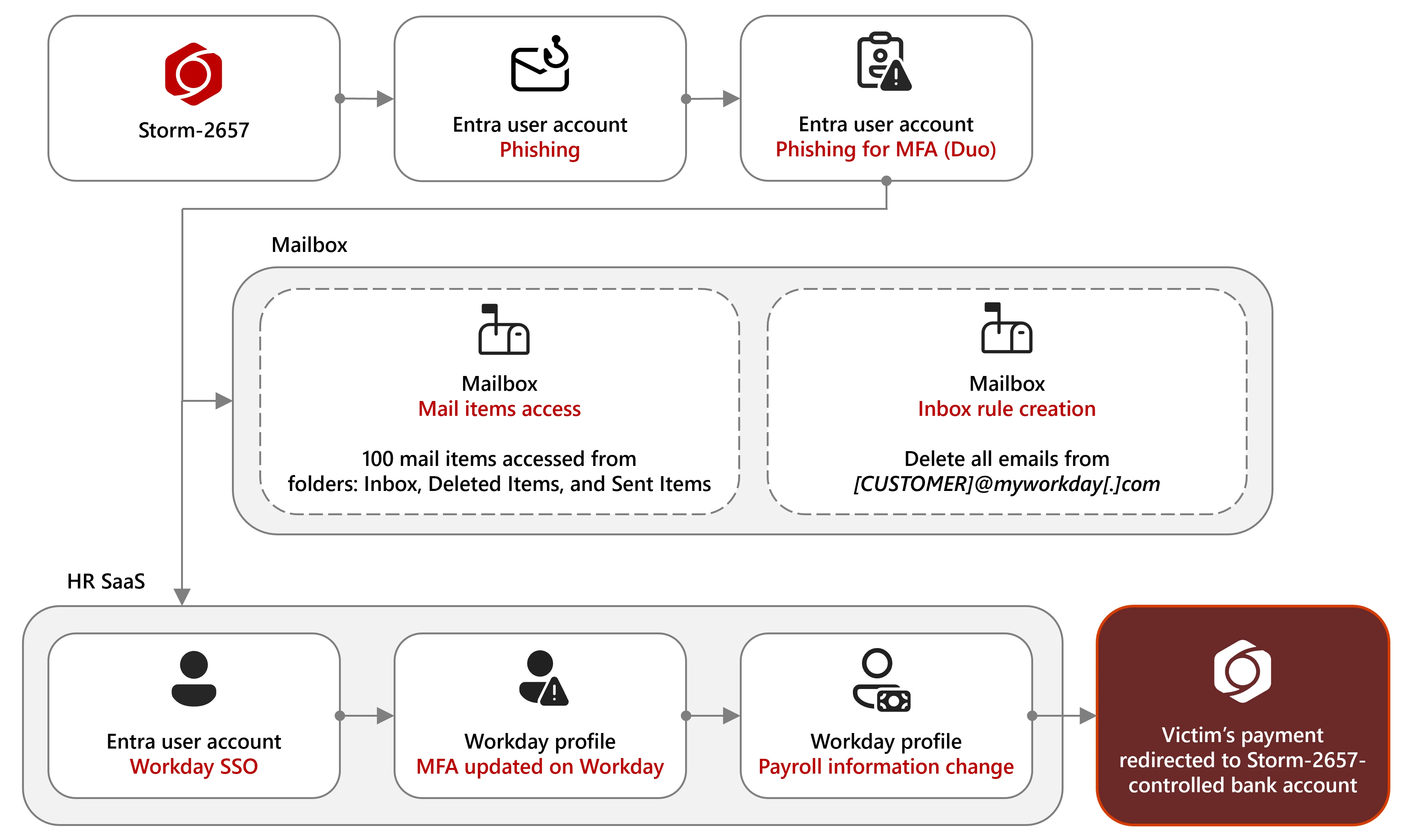
Microsoft observed a financially motivated group tracked as Storm-2657 using AITM phishing to steal MFA codes, compromise employee Exchange Online accounts, create inbox rules to hide Workday notifications, and redirect payroll to attacker-controlled bank accounts. The campaign targeted US universities and higher-education staff via tailored phishing themes and succeeded where phishing-resistant MFA was not enforced. #Storm-2657 #Workday
Keypoints
- Storm-2657 conducted “payroll pirate” attacks by compromising employee accounts to modify payroll/bank details in Workday and similar HR SaaS platforms.
- Initial access was gained through realistic phishing emails delivering AITM phishing links to capture credentials and MFA codes.
- The actor targeted US-based organizations, particularly universities, sending phishing to nearly 6,000 accounts across 25 universities with 11 confirmed compromised accounts.
- After compromise, attackers created inbox rules to delete or hide Workday notification emails to evade detection.
- Threat actors enrolled attacker-controlled phone numbers or devices as MFA methods to maintain persistence and bypass legitimate MFA controls.
- Microsoft Defender for Cloud Apps and Defender XDR can correlate Exchange Online and Workday signals to detect inbox rule creation followed by payroll changes.
- Mitigations include enforcing phishing-resistant, passwordless MFA (FIDO2, Windows Hello for Business, passkeys), resetting credentials, removing malicious inbox rules, and reverting unauthorized payroll changes.
MITRE Techniques
- [T1566] Phishing – Storm-2657 used realistic phishing emails with Google Docs or attacker-controlled redirects to harvest credentials and MFA codes (“phishing emails crafted to steal MFA codes using adversary-in-the-middle (AITM) phishing links”).
- [T1589] Gather Victim Identity Information – The actor tailored messages using institution and president names to make phishing more convincing (“Storm-2657 tailored the content based on the recipient’s institution”).
- [T1110] Brute Force (Credential Access) – Actors harvested credentials via phishing to gain access to accounts (credentials harvested from phishing emails targeted at university accounts leading to 11 compromised accounts).
- [T1098] Account Manipulation – The threat actor enrolled their phone numbers or devices as MFA methods to persist and bypass legitimate MFA (“established persistence by enrolling their own phone numbers as MFA devices”).
- [T1114] Email Collection – After compromise, the actor created inbox rules to delete Workday notifications and hide evidence (“created a generic inbox rule to hide or delete any incoming warning notification emails from the organization’s Workday email service”).
- [T1586] Modify Cloud Compute Infrastructure – The actor modified payroll/payment elections in Workday profiles to redirect salary payments (“modified the employee’s salary payment configuration in their HR profile, thereby redirecting future salary payments to accounts under the actor’s control”).
- [T1078] Valid Accounts – The adversary used compromised legitimate Exchange Online accounts to send further phishing campaigns and access Workday via SSO (“used compromised accounts to distribute further phishing emails” and “accessed Workday through single sign-on (SSO)”).
Indicators of Compromise
- [Email subjects] Phishing lure context – examples of subject lines used: “COVID-Like Case Reported — Check Your Contact Status”, “Please find the document forwarded by the HR Department for your review”.
- [Inbox rule events] Evidence of defense evasion – inbox rules deleting Workday messages captured as New-InboxRule / Set-InboxRule events (monitor for DeleteMessage or MoveToFolder actions).
- [Workday audit events] Payroll modification context – Workday action types like “Change My Account” and “Manage Payment Elections” indicating payment/bank detail changes.
- [Authentication events] MFA/device additions – events showing “Add iOS Device”, “Add Android Device”, or registrations of phone/MFA methods tied to victim accounts (persistence indicators).
- [Email volume] Bulk phishing senders – .edu senders sending to large recipient counts (example context: sender to ~500 recipients in a single organization; query looks for >100 recipients).