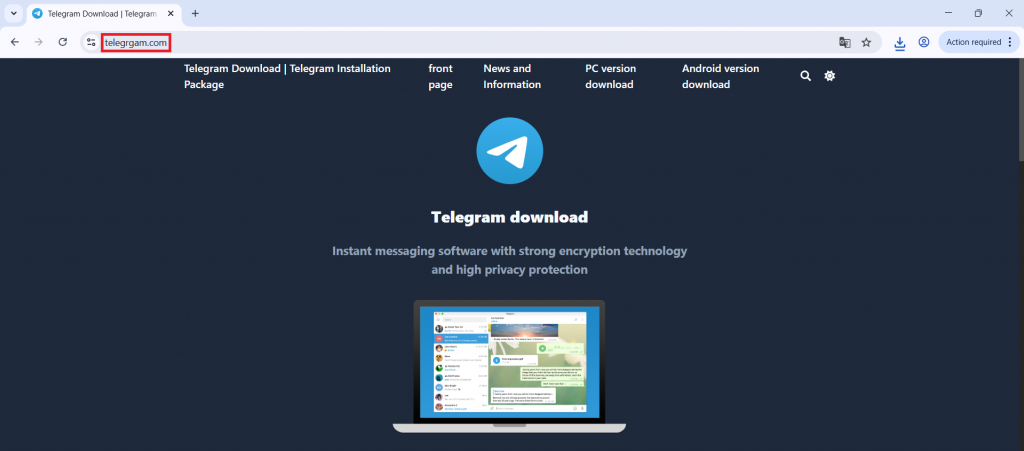
A typosquatted Telegram download site (telegrgam[.]com) distributed a malicious installer tsetup-x64.6.exe that modifies Windows Defender exclusions, drops staged payload files, and executes a DLL loader to reconstruct and run a PE payload from XML in memory. The in-memory payload communicates with a C2 at jiijua[.]com / 27.50.59.77:18852 for commands and runtime updates while using registry markers for persistence. #tsetup_x64_6_exe #AutoRecoverDat_dll
Keypoints
- Attackers used a typosquatted Telegram site (telegrgam[.]com) to trick users into downloading a malicious installer named tsetup-x64.6.exe.
- The installer launches commands via cmd.exe, enumerates processes, and checks for specific processes like 0tray.exe before proceeding.
- Malware disables Windows Defender scanning by adding all drive partitions to Defender exclusions via an obfuscated PowerShell command.
- Multiple staged files are dropped under C:UsersAppDataRoamingEmbarcadero and a legitimate Telegram installer (telegrom.exe) is dropped to maintain the appearance of a normal install.
- A malicious DLL (exposing DllRegisterServer) reads encoded PE data from XML (e.g., GPUCache.xml), reconstructs the PE, and loads it directly into memory (reflective/manual PE loading) to evade file-based detection.
- The in-memory payload establishes persistent TCP C2 communication with jiijua[.]com and 27.50.59.77:18852 to receive commands and download updated payloads.
MITRE Techniques
- [T1189 ] Drive-by Compromise – Malware distributed through fake Telegram website (‘Malware distributed through fake Telegram website’)
- [T1059.003 ] Command Shell – Malware executes commands using cmd.exe (‘Malware executes commands using cmd.exe’)
- [T1059.001 ] PowerShell – PowerShell used to modify Defender settings (‘PowerShell used to modify Defender settings’)
- [T1562.001 ] Disable Security Tools – Windows Defender exclusions added (‘Windows Defender exclusions added’)
- [T1027 ] Obfuscated/Compressed Files – PowerShell command obfuscation observed (‘PowerShell command obfuscation’)
- [T1112 ] Modify Registry – Registry key HKCUMicrosoft UserSource created as an infection marker (‘Registry key HKCUMicrosoft UserSource created’)
- [T1218.011 ] Signed Binary Proxy Execution – Payload executed via rundll32.exe to run malicious DLL code (‘Payload executed via rundll32.exe’)
- [T1620 ] Reflective Code Loading – PE payload reconstructed from XML and loaded in memory (‘PE payload reconstructed from XML and loaded in memory’)
- [T1071 ] Application Layer Protocol – TCP communication with remote server used for C2 (‘TCP communication with remote server’)
- [T1105 ] Ingress Tool Transfer – Malware downloads updated payload components from the C2 server (‘Malware downloads updated payload from C2’)
Indicators of Compromise
- [File Hashes ] Observed MD5 hashes for malicious samples – A9A5CC6B6766FEC51B281B94F5F17CCD (tsetup-x64.6.exe), 62F8EFFC7690455ABCB300E3574F0A93 (loaded payload)
- [File Names ] Malicious and dropped files involved in the chain – tsetup-x64.6.exe (malicious installer), telegrom.exe (legitimate Telegram installer dropped), and staged files like AutoRecoverDat.dll, GPUCache.xml
- [Domains ] Malicious/related domains – jiijua[.]com (C2), telegrgam[.]com (typosquatted download site) and other typosquats such as www.telefgram.com, www.tejlegram.com
- [IP Addresses ] C2 infrastructure – 27.50.59.77:18852 (observed TCP connection to C2)
- [Registry ] Persistence artifact used as an infection marker – HKCUMicrosoft UserSource (registry value created by installer)