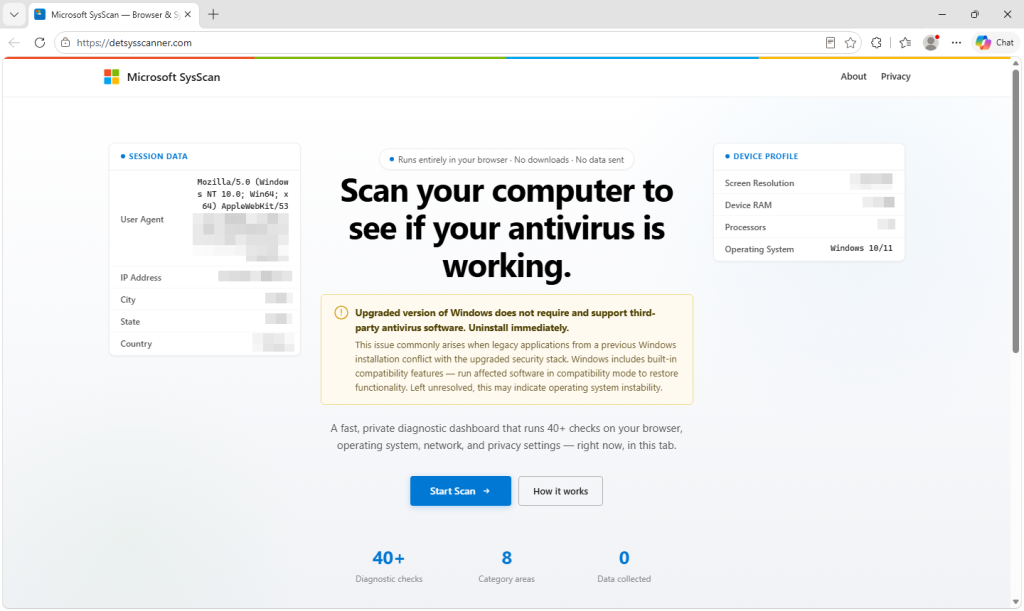
A group of Microsoft-branded SysScan websites is using fake security scans to falsely claim that third-party antivirus on Windows is causing serious problems and should be uninstalled. The scam funnels victims into a refund call, collects personal and banking details, and sends the data to Telegram while presenting a fake handoff to a “refund manager.” #SysScan #Microsoft #Telegram #MicrosoftDefenderAntivirus
Keypoints
- The investigation found 11 related scam sites on a single host, all using similar Microsoft branding and fake scan results.
- The pages falsely claim Windows no longer supports third-party antivirus and pressure users to uninstall it immediately.
- The scan is not real; it only reads browser-exposed data and combines it with invented conclusions and fixed fake checks.
- The scam collects extensive victim data, including name, address, phone numbers, email, refund details, banking information, and remote-access credentials.
- Submitted form data is sent directly to Telegram’s bot API, with no traditional backend used, making the operation cheap and disposable.
- The sites then redirect victims to a waiting page that promises a refund manager call within minutes, reinforcing the illusion of legitimacy.
- Indicators in the code suggest the pages may have been built with AI-assisted coding and adapted from a broader scanner template.
MITRE Techniques
- [T1566.002 ] Phishing: Spearphishing Link – Victims are lured to a fake Microsoft-branded scan site that initiates the refund scam and harvests information by presenting a convincing but fraudulent security check (‘A website claims to find deep problems with your computer…’).
- [T1204.001 ] User Execution: Malicious Link – The scam depends on the user visiting the website, running the fake scan, and proceeding through the form and refund steps (‘Run the scan again’, ‘After submitting the form’).
- [T1041 ] Exfiltration Over C2 Channel – Submitted customer and banking data is bundled and sent directly to Telegram’s bot API for collection by the scammers (‘the browser bundles… into a single message and sends it directly to Telegram’s bot API’).
- [T1001 ] Data Obfuscation – The site mixes real browser data with fabricated checks and random results to make the output seem credible while hiding the true nature of the scam (‘reads information… but the security conclusions aren’t connected’).
- [T1056.001 ] Input Capture: Keylogging – The form is designed to capture sensitive information entered by the victim or operator, including banking and remote-access credentials (‘It collects a name, address… and the ID and password for a remote-access session’).
- [T1219 ] Remote Access Software – The scam explicitly requests installation/use of remote-access tools and collects credentials for them as part of the fraud (‘Users can choose from 30 different remote-access tools’, ‘install remote-access software’).
- [T1055 ] Process Injection – Not mentioned.
Indicators of Compromise
- [IP address ] Single hosting IP used for the scam site cluster – 157.230.180.90
- [Domains ] Microsoft-branded fake scan and related lookalike domains – detectsysscanner[.]at, detectsysscanner[.]com, techsysscanner[.]com, and 7 more domains
- [Platform/API ] Data collection endpoint used to exfiltrate form submissions – Telegram’s bot API
- [Branding/Service names ] Fake scanner branding and misleading product references – SysScan, Microsoft Defender Antivirus