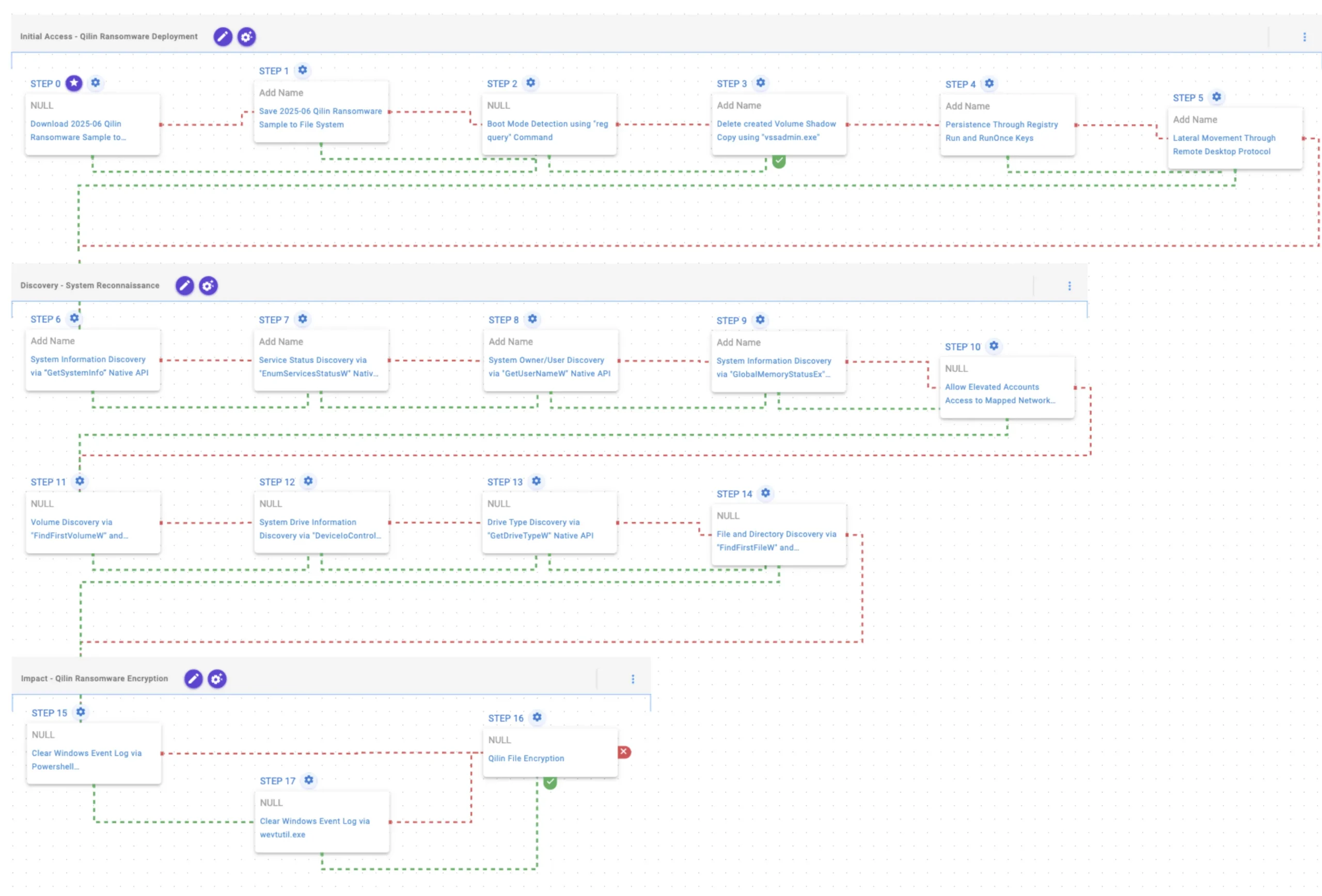
Qilin is a RaaS strain that evolved from Agenda (Go) into a Rust-based, cross-platform ransomware family targeting Windows, Linux, and ESXi with advanced evasion including BYOVD, Safe Mode detection, and shadow copy deletion, using AES-256 and RSA-2048 for encryption. AttackIQ published an emulation/attack graph to validate defenses against Qilin TTPs and recommends extended scenarios for broader testing. #Qilin #Agenda
Keypoints
- Qilin originated in July 2022 from the Agenda group, initially written in Go and later rewritten in Rust to improve cross-platform support and evasion.
- The ransomware expanded targeting to Windows, Linux, and ESXi and became one of the most active ransomware families in 2025, surpassing RansomHub in Q2.
- Notable victim sectors include healthcare, education, and government, with a high-profile 2024 incident affecting Synnovis and multiple NHS hospitals.
- Operators use advanced techniques including BYOVD to disable EDR, reboot to Safe Mode to evade defenses, and delete volume shadow copies to prevent recovery.
- Qilin encrypts files using AES-256 (CTR) for file encryption and RSA-2048 to protect the encryption key, making recovery without keys infeasible.
- AttackIQ released attack graphs emulating Qilin TTPs (based on TrendMicro and Group-IB reporting) to help organizations validate detection, prevention, and response controls.
- Recommended extensions to the emulation include remote PowerShell execution via PaExec and AD discovery via Get-ADComputer to simulate broader lateral and domain-level activity.
MITRE Techniques
- [T1105] Ingress Tool Transfer – Qilin sample (SHA256: e90b…) is saved to disk in scenarios to test delivery of malicious samples: “The Qilin Ransomware Sample (SHA256: e90b…c22527) is saved to disk…”
- [T1012] Query Registry – Boot Mode Detection using “reg query” to check SystemStartOptions for Safe Mode status: “queries the SystemStartOptions registry key to uncover specific details about how the system is configured to start”
- [T1490] Inhibit System Recovery – Delete created Volume Shadow Copy using “vssadmin.exe” to remove recovery snapshots: “executes the vssadmin.exe utility to delete a recent Volume Shadow Copy”
- [T1547.001] Registry Run Keys/Startup Folder – Persistence through creating entries under HKLMSoftwareMicrosoftWindowsCurrentVersionRun to run at startup: “creates an entry under the HKLMSoftwareMicrosoftWindowsCurrentVersionRun registry key to be run at system startup”
- [T1021.001] Remote Services: RDP – Lateral movement attempts using Remote Desktop Protocol to move within the network: “attempts to move laterally within a network using the Remote Desktop Protocol (RDP) protocol”
- [T1082] System Information Discovery – Use of GetSystemInfo, GlobalMemoryStatusEx, FindFirstVolumeW/FindNextVolumeW, DeviceIoControl to collect system and drive data: “executes the GetSystemInfo Windows native API call to retrieve system information”
- [T1007] Service Discovery – Service status enumeration via EnumServicesStatusW to gather configured service information: “executes the EnumServicesStatus Windows native API call to gather critical information about configured services”
- [T1033] Account Discovery – Retrieve account name via GetUserNameW to identify system owner/user: “executes the GetUserNameW Windows native API call to retrieve the account name associated with the local computer”
- [T1112] Modify Registry – EnableLinkedConnections registry modification to allow elevated processes access to mapped drives: “modifies the EnableLinkedConnections registry key to make sure mapped drives are accessible”
- [T1120] Peripheral Device Discovery – Drive type discovery using GetDriveTypeW to enumerate physical disk information: “retrieves information about the system’s physical disks using the GetDriveTypeW Windows API call”
- [T1083] File and Directory Discovery – Enumerate filesystem via FindFirstFileW and FindNextFileW to identify files for encryption: “executes the FindFirstFileW and FindNextFileW Windows native API calls to enumerate the file system”
- [T1070.001] Clear Windows Event Logs – Clear event logs using PowerShell GlobalSession.ClearLog and fallback to wevtutil.exe to remove forensic traces: “uses the GlobalSession.ClearLog Powershell cmdlet to clear Windows Event Logs… uses the wevtutil.exe binary to clear event logs”
- [T1486] Data Encrypted for Impact – Qilin file encryption routines using AES-256 (CTR) for files and RSA-2048 for key protection: “Files matching an extension list are identified and encrypted in place using similar encryption algorithms as used by Qilin ransomware”
Indicators of Compromise
- [File Hash ] Qilin sample used in emulation – SHA256: e90bdaaf5f9ca900133b699f18e4062562148169b29cb4eb37a0577388c22527
- [File Name/Utility ] Legitimate utilities abused – vssadmin.exe (used to delete shadow copies), wevtutil.exe (used to clear event logs)
- [Registry Keys/Values ] Persistence and configuration – HKLMSoftwareMicrosoftWindowsCurrentVersionRun (persistence entry), SystemStartOptions (boot mode detection), EnableLinkedConnections (mapped drive access)
- [APIs/Commands ] Commands and API calls indicative of discovery and impact – reg query (boot mode check), GetSystemInfo/GetUserNameW/FindFirstFileW (system and file discovery)
- [Protocols/Services ] Lateral movement vector – Remote Desktop Protocol (RDP) usage for lateral movement
Read more: https://www.attackiq.com/2025/10/02/emulating-qilin-ransomware/