Keypoints
- LokiLocker is a .NET-based RaaS active since at least August 2021, protected with NETGuard and KoiVM, and distinct from Locky and LokiBot.
- The ransomware encrypts files with AES-256-GCM and protects keys with RSA-2048, and can optionally wipe non-system files and overwrite the MBR.
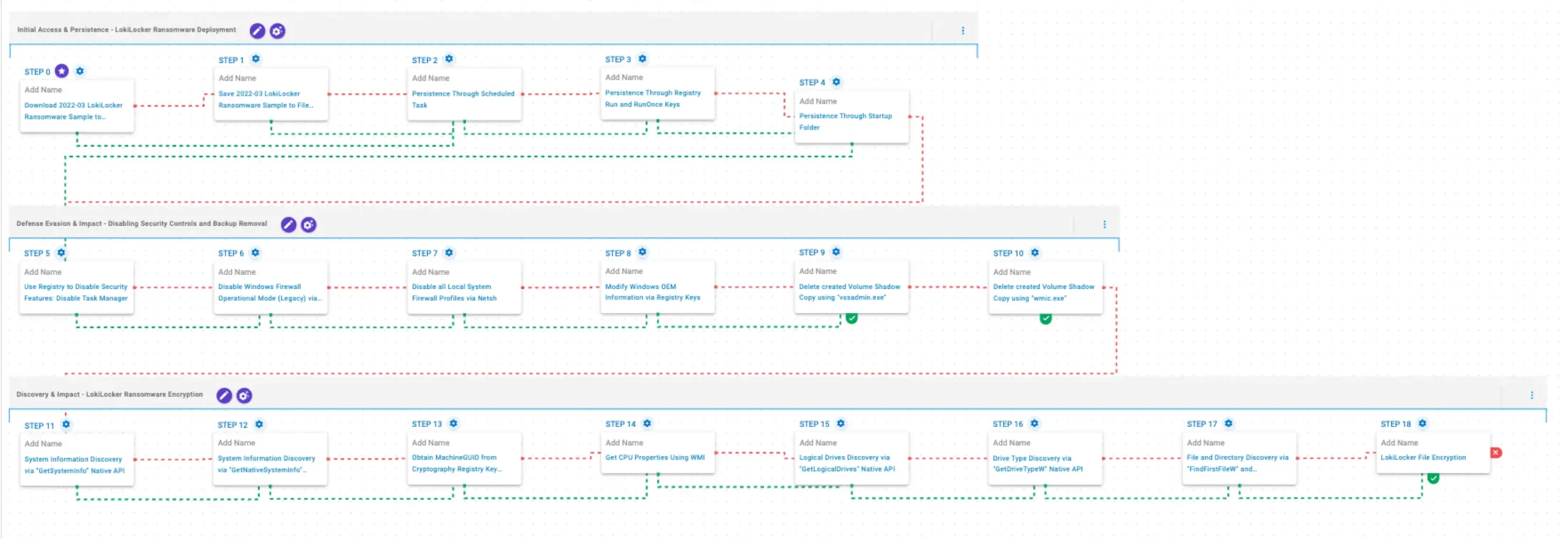
- AttackIQ released an emulation on its AEV platform that reproduces LokiLocker deployment TTPs to validate detection, prevention, and response controls.
- Persistence techniques in the emulation include creating Scheduled Tasks, modifying Registry Run/RunOnce keys, and placing files in the Windows Startup folder.
- Defense-evasion and impact behaviors include disabling Task Manager, turning off Windows Firewall via netsh, modifying OEM registry information, and deleting Volume Shadow Copies with vssadmin/wmic.
- Discovery behaviors include system and drive enumeration via native APIs and WMI, filesystem traversal, and the file encryption routine (mapped to T1486).
MITRE Techniques
- [T1105 ] Download Tool or File – Emulation downloads payloads to memory and saves to disk to test delivery controls (‘These scenarios download to memory and save to disk in two separate scenarios to test network and endpoint controls and their ability to prevent the delivery of known malicious samples.’)
- [T1053.005 ] Scheduled Task/Job – Persistence via creation of a scheduled task using schtasks (‘This scenario creates a new scheduled task for persistence using the schtasks utility.’)
- [T1547.001 ] Registry Run Keys / Startup Folder – Persistence via Registry Run/RunOnce entries and adding files to the Startup folder (‘This scenario creates an entry under the HKLMSoftwareMicrosoftWindowsCurrentVersionRun registry key… and acquires persistence by adding files to the operating system Startup Directory.’)
- [T1112 ] Modify Registry to Disable Security Tools – Disables Task Manager by setting DisableTaskMgr in the registry (‘This scenario modifies the registry value DisableTaskMgr under the key HKCUSoftwareMicrosoftWindowsCurrentVersionPoliciesSystem to 1, which disables Task Manager.’)
- [T1562.004 ] Disable or Modify Firewall – Uses legacy netsh commands to disable Windows Firewall (all profiles and operational mode) (‘This scenario uses the netsh command with the allprofiles mode to disable Windows Firewall.’ / ‘This scenario uses legacy netsh configuration parameters to disable the Windows Firewall.’)
- [T1490 ] Inhibit System Recovery – Deletes Volume Shadow Copies using vssadmin.exe and wmic.exe to prevent restoration (‘This scenario executes the vssadmin.exe utility to delete a recent Volume Shadow Copy…’ / ‘This scenario executes the wmic shadowcopy delete command to delete a Volume Shadow Copy…’)
- [T1082 ] System Information Discovery – Uses GetSystemInfo, GetNativeSystemInfo, and GetLogicalDrives APIs to collect system and drive information (‘This scenario executes the GetSystemInfo Windows native API call to retrieve system information.’ / ‘This scenario executes the GetLogicalDrives Windows API call to retrieve the currently available disk drives.’)
- [T1012 ] Query Registry – Obtains MachineGUID via reg query to uniquely identify the system (‘This scenario executes the reg query command to obtain information from the registry. It targets the MachineGUID entry within the HKLMSOFTWAREMicrosoftCryptography registry key…’)
- [T1497.001 ] CPU/Core Discovery – Uses WMI to get CPU properties (‘This scenario uses Windows Management Instrumentation (WMI) to obtain details about the processors installed on the system.’)
- [T1120 ] Drive Type Discovery – Uses GetDriveTypeW to determine drive types (‘This scenario retrieves information about the system’s physical disks using the GetDriveTypeW Windows API call.’)
- [T1083 ] File and Directory Discovery – Enumerates files and directories using FindFirstFileW and FindNextFileW (‘This scenario executes the FindFirstFileW and FindNextFileW Windows native API calls to enumerate the file system.’)
- [T1486 ] Data Encrypted for Impact – Performs file encryption routines (AES-256-GCM with RSA-2048 key protection) on targeted file types (‘This scenario performs the file encryption routines used by common ransomware families. Files matching an extension list are identified and encrypted in place using similar encryption algorithms as used by LokiLocker ransomware.’)
Indicators of Compromise
- [File Names ] utilities and executables used by the ransomware and emulation – vssadmin.exe, wmic.exe
- [Registry Keys / Values ] persistence and system identifiers referenced – HKLMSoftwareMicrosoftWindowsCurrentVersionRun (persistence), HKLMSOFTWAREMicrosoftCryptographyMachineGUID (system identifier)
- [Commands / Tools ] command-line utilities used for persistence and disabling controls – schtasks, netsh
- [Filesystem Locations ] persistence and startup locations – Windows Startup folder, Scheduled Task entries (created via schtasks)
Read more: https://www.attackiq.com/2026/02/26/emulating-lokilocker-ransomware/