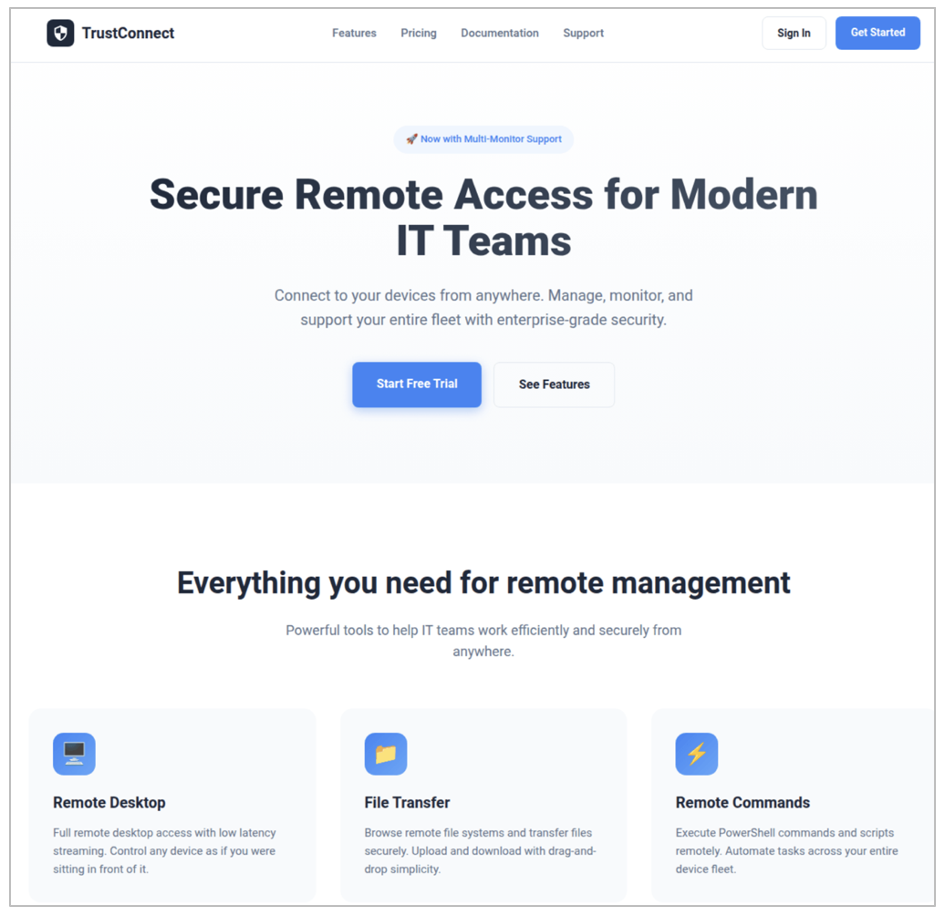
Proofpoint identified a new malware-as-a-service (MaaS) called TrustConnect that masqueraded as a legitimate remote monitoring and management (RMM) tool, used an EV code signing certificate to sign branded installers, and provided a web-based C2/dashboard with automated payload generation and a $300/month subscription model. Proofpoint disrupted the TrustConnect infrastructure (C2 domain trustconnectsoftware[.]com and IP 178[.]128[.]69[.]245), but the actor showed resilience by pivoting to a new agent named DocConnect; the operation is linked to a Telegram handle seen in prior Redline activity. #TrustConnect #DocConnect
Keypoints
- TrustConnect is a MaaS that deliberately masqueraded as a legitimate RMM product (TrustConnectAgent) and marketed subscription access via trustconnectsoftware[.]com.
- The actor purchased an Extended Validation (EV) certificate and used it to sign installers, aiding evasion of signature-based detections until the certificate was revoked.
- Email campaigns with lures (e.g., MsTeams.exe) and hosted executables were used for delivery, and the installers dropped TrustConnectAgent.exe which checked in to the TrustConnect C2.
- The platform provided a web-based C2/dashboard with device management, remote desktop (WebSocket streaming), file transfer, command execution, audit logs, and branded installer generation.
- TrustConnect operators deployed follow-on legitimate remote-access tooling (ScreenConnect, Level RMM) from abused or pirated instances to enable hands‑on‑keyboard activity.
- Proofpoint disrupted the primary C2 (178[.]128[.]69[.]245 / trustconnectsoftware[.]com) but observed a pivot to a reworked platform and payload under the names DocConnect / SHIELD OS v1.0 using React/Supabase and SignalR.
MITRE Techniques
- [T1566] Phishing – Delivery via email campaigns containing URLs to malicious executables (lures such as bid invites and meeting invites). (‘Messages contained URLs leading to an executable file “MsTeams.exe”.’)
- [T1204] User Execution – Victim interaction required to run delivered executables which then dropped the RAT. (‘The executable dropped a file called “TrustConnectAgent.exe” which communicated with the TrustConnect RAT C2 server’)
- [T1059.001] Command and Scripting Interpreter: PowerShell – One-liner PowerShell loader and remote intermediate script used to install the RAT. (‘one-liner PowerShell script to run a remote intermediate script that will install the RAT’)
- [T1105] Ingress Tool Transfer – Download and installation of additional tools (e.g., ScreenConnect client MSI) from attacker-controlled URLs. (‘hxxps://…/Bin/ScreenConnect.ClientSetup.msi?e=Access&y=Guest’)
- [T1071.001] Application Layer Protocol: Web Protocols – Malware and panel communication over HTTPS APIs and WebSocket-based remote desktop streaming. (‘The malware communicates with the C2 on the same API as the web panel and doesn’t use any additional encryption other than standard SSL/TLS.’ )
- [T1021] Remote Services / [T1219] Remote Access Tools – Use and deployment of legitimate remote access tools (ScreenConnect, Level RMM) and built-in RDP/remote desktop features for hands-on control. (‘The remote desktop management function includes features for full mouse and keyboard control…’; ‘deploying ScreenConnect’)
- [T1553] Subvert Trust Controls (Code Signing) – Use of an Extended Validation certificate to sign malware binaries to aid detection evasion. (‘the actor used this EV certificate to sign the malware’)
Indicators of Compromise
- [Domain ] C2 and distribution – trustconnectsoftware[.]com (TrustConnect C2/site), networkservice[.]cyou (DocConnect C2)
- [IP Address ] C2 server – 178[.]128[.]69[.]245 (TrustConnect C2)
- [File Hash (SHA256) ] malware samples – cee6895f7df01da489c10bf5b83770ceede79ed4e1c8c4f8ea9787a4d035c79b (TrustConnectAgent.exe), cf85a4816715b8fa6c1eb5b50d1c70cfef116522742f6f1c77cb8689166b9f40 (MsTeams.exe), and 1 more DocConnect testing hash
- [Payload Staging Domains ] staging and hosting – adobe[.]caladzy[.]com, ametax[.]net (used as payload staging domains)
- [File Names ] installer and agent names – MsTeams.exe, TrustConnectAgent.exe (branded installers delivered to targets)
- [Payload URLs ] ScreenConnect payload locations – hxxps://memphiswawu[.]com/Bin/ScreenConnect.ClientSetup[.]msi, hxxp://192[.]159[.]99[.]83/Bin/ScreenConnect[.]ClientSetup[.]msi (used to deliver legitimate remote-access installers)
- [Account/Handle ] operator contact – Telegram handle @zacchyy09 (support/sales contact linked to the MaaS)
Read more: https://www.proofpoint.com/us/blog/threat-insight/dont-trustconnect-its-a-rat