GreenBlood is a Go-based ransomware family that targets Windows systems with fast, parallel encryption, appending .tgbg or .gblood extensions and dropping ransom notes such as READ_ME_TO_RECOVER_FILES.txt. The blog demonstrates detection and response using Sysmon, custom Wazuh rules, and YARA-based Active Response to automatically identify and remove GreenBlood artifacts. #GreenBlood #Wazuh
Keypoints
- GreenBlood is a Go-compiled ransomware that prioritizes high-speed, parallel file encryption and a double-extortion model (encryption + data leak via Tor-based site).
- Observed behaviors include creating ransom notes (READ_ME_TO_RECOVER_FILES.txt or HOW_TO_RECOVER_FILES.txt), appending .tgbg or .gblood extensions to encrypted files, and placing notes across user folders (Downloads, Desktop, Documents).
- The ransomware disables system recovery and defenses using commands like vssadmin delete shadows /all /quiet, wmic shadowcopy delete, wbadmin delete catalog -quiet, bcdedit (disable recovery/ignore failures), netsh advfirewall set allprofiles state off, and registry changes to disable Defender real-time protection.
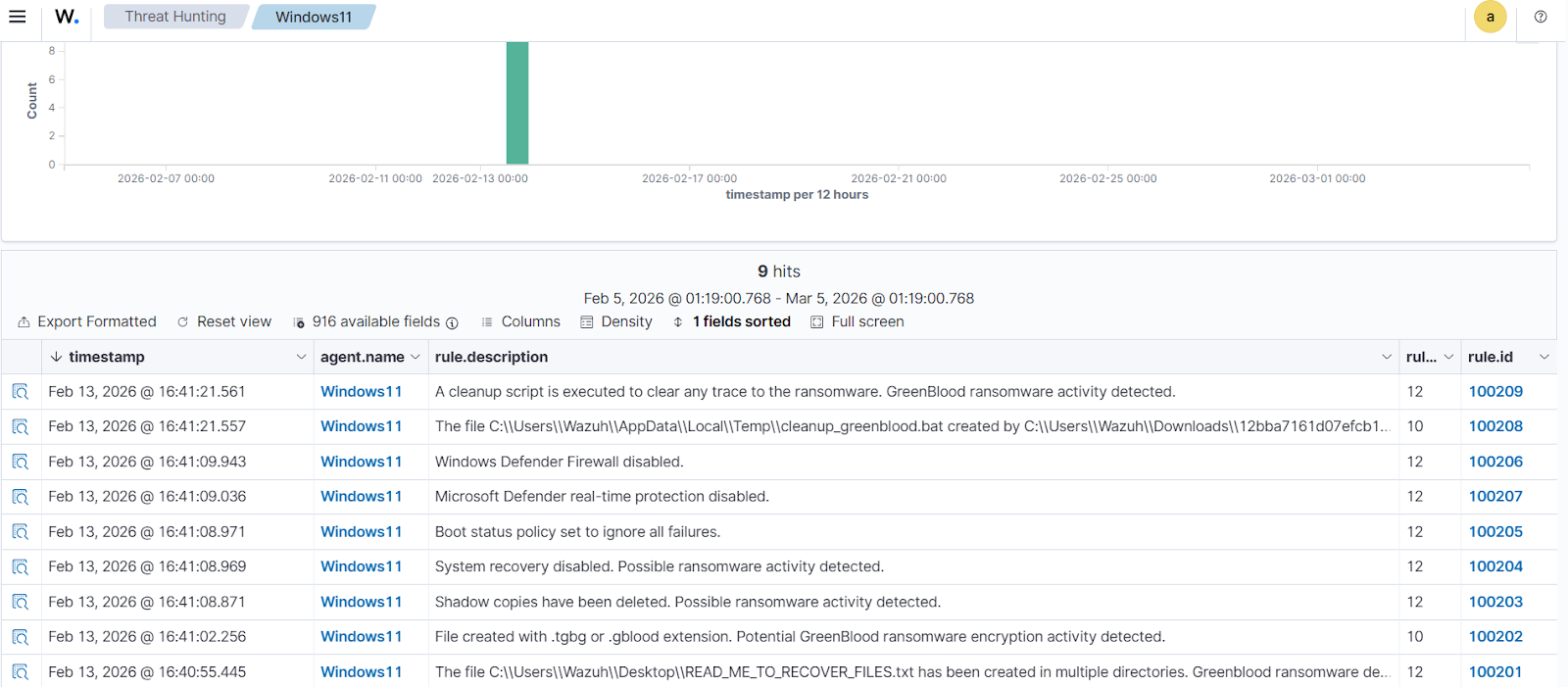
- Detection is implemented by collecting Sysmon logs on Windows endpoints and deploying custom Wazuh rules (group greenblood) that map observable behaviors to rule IDs 100201–100209 for timely alerts.
- Active prevention uses Wazuh File Integrity Monitoring plus YARA integration and an Active Response script (yara.bat) to scan and automatically remove detected GreenBlood files, with dashboard rules to surface scan and removal results.
- One analyzed sample SHA256 is provided for hunting and analysis: 12bba7161d07efcb1b14d30054901ac9ffe5202972437b0c47c88d71e45c717605294c9970f365c92e0b0f1250db678dc356dbf418dba27bdd5eeb68487a7199.
MITRE Techniques
- [T1486 ] Data Encrypted for Impact – Ransomware encrypts files across the system and appends distinct extensions to encrypted files; (‘encrypts the files and appends a .tgbg or .gblood extension to the encrypted files.’)
- [T1059 ] Command and Scripting Interpreter – Uses scripts and command execution (batch and cmd) to perform actions such as running cleanup scripts; (‘cmd /C C:UsersAppDataLocalTempcleanup_greenblood.bat’)
- [T1059.003 ] Windows Command Shell – Executes Windows command shell instructions to change system settings and run cleanup tasks; (‘cmd /C C:UsersAppDataLocalTempcleanup_greenblood.bat’)
- [T1490 ] Inhibit System Recovery – Deletes shadow copies and disables automatic recovery to prevent forensic restoration; (‘vssadmin delete shadows /all /quiet’, ‘wmic shadowcopy delete’, ‘wbadmin delete catalog -quiet’, ‘bcdedit /set {default} recoveryenabled No’)
- [T1087 ] (Referenced in detection rules) Account/Host Discovery mapping used in rule grouping for disabling defenses – Rules flag commands that alter firewall or Defender settings as suspicious activity; (‘netsh advfirewall set allprofiles state off’, ‘reg add “HKLMSOFTWAREPoliciesMicrosoftWindows DefenderReal-Time Protection” /v DisableRealtimeMonitoring /t REG_DWORD /d 1 /f’)
Indicators of Compromise
- [File Hash ] analyzed sample SHA256 – 12bba7161d07efcb1b14d30054901ac9ffe5202972437b0c47c88d71e45c717605294c9970f365c92e0b0f1250db678dc356dbf418dba27bdd5eeb68487a7199
- [File Name ] ransom note filenames – READ_ME_TO_RECOVER_FILES.txt, HOW_TO_RECOVER_FILES.txt
- [File Extension ] encrypted file extensions appended by the ransomware – .tgbg, .gblood
- [File Name ] cleanup artifact – cleanup_greenblood.bat (created in %LOCALAPPDATA%Temp and executed via cmd)
- [File Path ] monitored path used for detection – C:Users*Downloads (configured for real-time monitoring in Wazuh syscheck)
- [Command/Pattern ] destructive and disabling commands observed – ‘vssadmin delete shadows /all /quiet’, ‘bcdedit /set {default} recoveryenabled No’, ‘netsh advfirewall set allprofiles state off’ (and other related commands)
Read more: https://wazuh.com/blog/detecting-and-responding-to-greenblood-ransomware-with-wazuh/