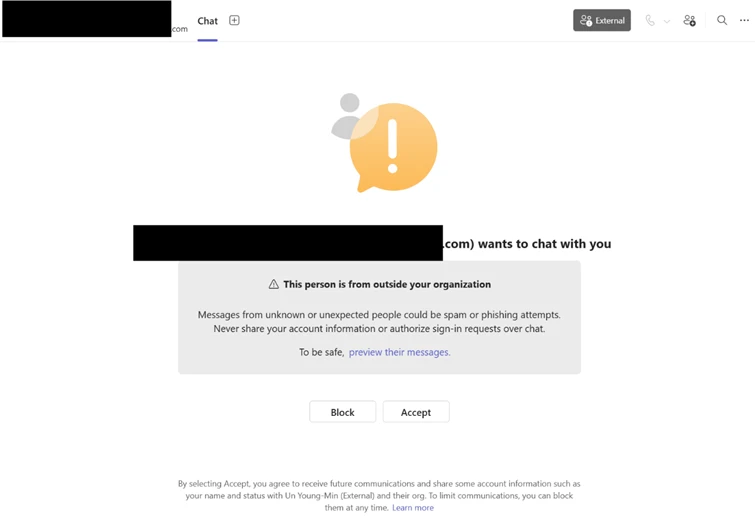
Attackers impersonate IT/help‑desk via cross‑tenant Microsoft Teams chats and calls (often with vishing) to socially engineer users into launching remote support tools like Quick Assist, granting interactive control, and approving elevation prompts; they then perform rapid reconnaissance, stage payloads via DLL side‑loading, and establish HTTPS command‑and‑control before pivoting via WinRM and deploying auxiliary management tooling. Defenders should prioritize user education, enforce Conditional Access and MFA, restrict remote management tools and WinRM, enable Safe Links and ZAP for Teams, and apply ASR/WDAC to prevent sideloading and detect Rclone exfiltration. #QuickAssist #Rclone
Keypoints
- Adversaries use cross‑tenant Teams chats and occasional voice phishing to convince users to initiate remote support sessions (e.g., Quick Assist) and approve elevation prompts, enabling hands‑on control.
- Initial interactive reconnaissance occurs within 30–120 seconds of remote access, typically evidenced by immediate cmd.exe/PowerShell activity to enumerate user context, OS, and domain membership.
- Payloads are staged to user‑writable locations (e.g., ProgramData), then executed via DLL side‑loading of signed/trusted binaries (examples: AcroServicesUpdater2_x64.exe, ADNotificationManager.exe, DlpUserAgent.exe, werfault.exe) to run attacker modules under a trusted context.
- Attackers store large encoded/encrypted configuration data in user‑context registry locations and decrypt it in memory at runtime to avoid disk writes and maintain persistence across restarts.
- Compromised processes beacon to external infrastructure over HTTPS (blended C2), and lateral movement proceeds via WinRM using credential‑backed access to target high‑value systems like domain controllers.
- Attackers deploy auxiliary remote management tooling via msiexec and use Rclone to exfiltrate targeted business data to cloud storage while excluding certain file types to reduce noise.
- Microsoft recommends layered defenses: enforce Conditional Access and MFA for admins, restrict WinRM, enable Safe Links and ZAP for Teams, apply ASR/WDAC, block suspicious network destinations, and run focused user education campaigns.
MITRE Techniques
- [T1566.003 ] Phishing: Phishing via Service – Actors initiate cross‑tenant Teams chats and calls impersonating IT support to get users to grant remote access (‘a cross‑tenant Teams chat or call from an often newly created tenant using an IT/Help‑Desk persona’).
- [T1204 ] User Execution / Social Engineering – Users are induced to open Quick Assist, enter a key, and follow prompts to grant control and elevation (‘the attacker convinces them to open Quick Assist, enter a short key, the follow all prompts and approvals to grant access’).
- [T1021.006 ] Remote Services: Windows Remote Management (WinRM) – The actor pivots to other domain‑joined systems using WinRM for credential‑backed lateral movement (‘http://host.domain.local:5985/wsman’ with RequestUserAgent: ‘Microsoft WinRM Client’).
- [T1574.002 ] Hijack Execution Flow: DLL Side‑Loading – Staged payloads are executed by loading attacker DLLs through trusted signed applications (e.g., ‘AcroServicesUpdater2_x64.exe loading a staged msi.dll’).
- [T1071.001 ] Application Layer Protocol: Web Protocols (HTTPS) – The sideloaded updater process initiated outbound HTTPS connections to cloud‑backed endpoints for command‑and‑control (‘initiating outbound HTTPS connections over TCP port 443 to externally hosted infrastructure’).
- [T1078 ] Valid Accounts – Credential‑backed lateral movement is observed when WinRM is used from a user‑context remote session to access higher‑value hosts, indicating use of valid credentials (‘Use of WinRM from a non‑administrative application suggests credential‑backed lateral movement’).
- [T1567.002 ] Exfiltration: Exfiltration to Cloud Storage – Data was transferred externally using Rclone to cloud storage with targeted exclusions to minimize detection (‘Actors used the file‑synchronization tool Rclone to transfer data from internal network locations to an external cloud storage service’).
- [T1112 ] Modify Registry – Attackers write a large encoded value to a user‑context registry location to store encrypted configuration for later in‑memory decryption (‘a large encoded value is then written to a user‑context registry location, serving as a staging container for encrypted configuration data’).
Indicators of Compromise
- [File Name ] Remote support, sideload hosts, and exfil tools observed – QuickAssist.exe, AcroServicesUpdater2_x64.exe, and 6 more files (ADNotificationManager.exe, DlpUserAgent.exe, werfault.exe, AnyDesk.exe, TeamViewer.exe, rclone.exe).
- [File Path ] Common staging/execution directories – C:ProgramData (used to stage payloads and sideload DLLs), %AppData%Roaming (exe writes observed in hunting queries).
- [Registry Value ] Encoded configuration / hunting breadcrumbs – UCID, UFID (registry value names monitored under ‘SOFTWAREClassesLocal SettingsSoftwareMicrosoft’ and other user‑context keys) and other registry entries storing encoded loader state.
- [URL / Domain Pattern ] C2 and suspicious remote URLs – http://host.domain.local:5985/wsman (WinRM target example), and remote patterns such as ‘*.execute-api.*’ and high‑risk TLDs like ‘.top’, ‘.xyz’, ‘.click’ referenced in hunting rules.
- [Command / Tooling ] Auxiliary installation and exfiltration tools – msiexec.exe (remote MSI installation of management platform), rclone.exe (used to synchronize and exfiltrate data to cloud storage).