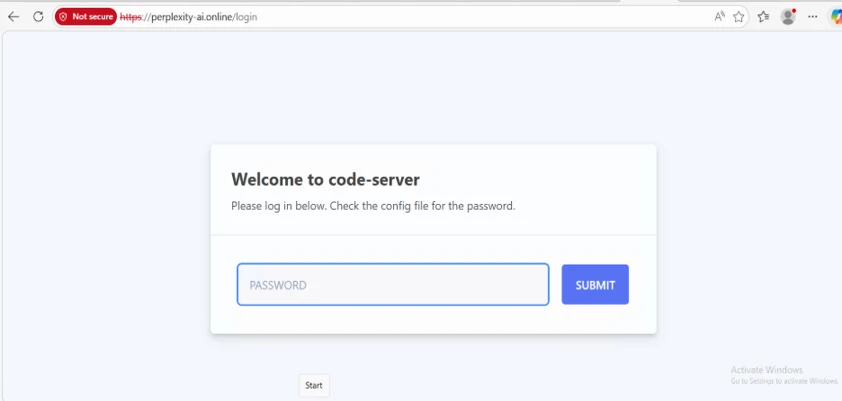
Microsoft Threat Intelligence identified a malicious Chromium extension impersonating Perplexity AI to intercept search traffic and collect user input through a typosquatted domain and attacker-controlled infrastructure. The extension was reported to Google and removed, and Microsoft highlighted the risk of AI-themed branding being abused for social engineering, query interception, and profiling. #PerplexityAI #Google #Chromium #perplexity-ai.online #flkebkiofojicogddingbdmcmkpbplcd
Keypoints
- The malicious extension impersonated Perplexity AI using similar branding and the domain perplexity-ai[.]online.
- It was designed to override browser search settings and intercept Omnibox queries in Chromium-based browsers.
- Real-time search suggestions were routed to attacker-controlled infrastructure, enabling keystroke-level capture before the user pressed Enter.
- The extension used Manifest V3 and declarativeNetRequest rules to hide malicious behavior while redirecting users to legitimate search engines.
- Microsoft observed evidence of query logging and full HTTP header collection on the attacker server, indicating intentional data collection.
- The extension was reported to Google and taken down after responsible disclosure.
- Microsoft recommends allow-listing extensions, reviewing permissions and domains, and monitoring for unusual search-related network activity.
MITRE Techniques
- [T1189 ] Drive-by Compromise – User installs a malicious browser extension after being deceived by branding that mimics Perplexity AI (‘User installs malicious Chromium extension using branding and naming similar to the Perplexity AI service from browser ecosystem’).
- [T1176 ] Browser Session Hijacking – The extension intercepts browser search activity and routes it through attacker infrastructure before redirecting to expected results (‘intercept and redirect all queries in a Chromium browser’s Omnibox’).
- [T1114 ] Email Collection – Not mentioned.
- [T1056.001 ] Input Capture: Keylogging – Real-time search suggestions capture typed characters before submission, effectively collecting keystrokes (‘every character typed in the address bar’ and ‘suggest_url captures real-time keystrokes during typing’).
- [T1036 ] Masquerading – The extension spoofs a legitimate AI service using typosquatted branding and a lookalike domain (‘spoofs the AI-powered answer engine Perplexity AI’ and ‘uses similar branding elements and a typosquatted domain’).
- [T1562.001 ] Impair Defenses: Disable or Modify Tools – The extension leverages legitimate browser-native APIs and MV3 logic to conceal malicious behavior (‘Uses legitimate MV3 APIs (DNR rules) to hide malicious behavior inside browser-native logic’).
- [T1071.001 ] Web Protocols – Queries and suggestion traffic are sent over web requests to attacker-controlled infrastructure (‘Browser requests routed to perplexity-ai[.]online’ and ‘Proxies suggestion queries to suggestqueries.google[.]com’).
Indicators of Compromise
- [Domain ] Typosquatted search-redirection infrastructure – perplexity-ai[.]online, extension.tilda[.]ws/perplexityai
- [Extension ID ] Malicious Chromium extension identifier – flkebkiofojicogddingbdmcmkpbplcd
- [URL ] Onboarding and installation page used by the extension – hxxps://extension.tilda[.]ws/perplexityai, hxxps://perplexity-ai[.]online/search/{searchTerms}
- [File name ] Server-side components shipped with the threat – server.js, nginx.conf
- [Rule/resource file ] Modular redirect logic referenced by the extension – perplexity-rules.json, bing-rules.json, and other rule sets