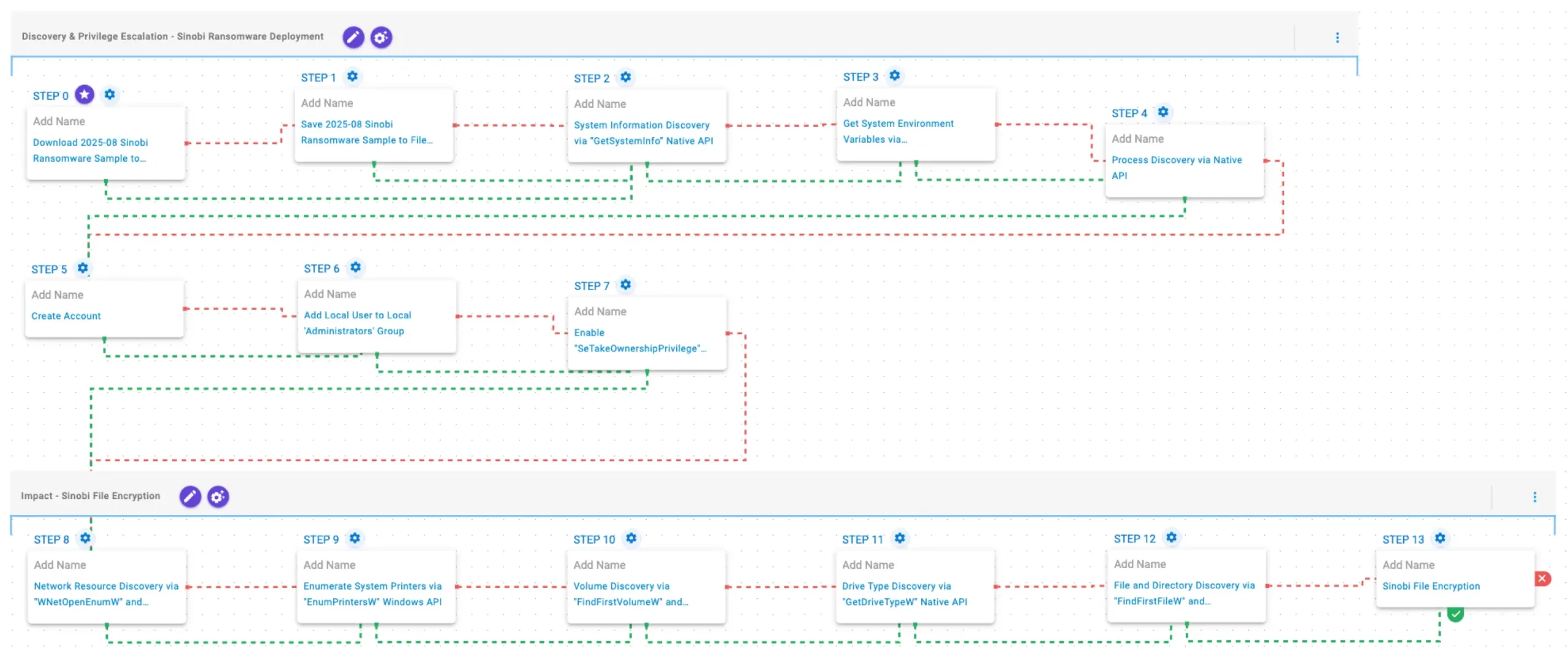
Sinobi is a financially motivated ransomware group that emerged in June 2025 operating a closed, hybrid Ransomware-as-a-Service model and likely represents a rebrand or direct successor to the Lynx and INC families. AttackIQ released an emulation of Sinobi’s TTPs for its Adversarial Exposure Validation (AEV) platform to help organizations validate detection, prevention, and response against discovery, privilege escalation, network and file enumeration, and AES-128/Curve25519 file-encryption behaviors. #Sinobi #AttackIQ
Keypoints
- Sinobi surfaced in late June 2025 as a financially motivated, closed hybrid RaaS operation with a core team handling malware, infrastructure, and payments and a small set of trusted affiliates performing intrusions.
- Technical and infrastructural overlaps indicate Sinobi is likely a rebrand or direct successor of the Lynx ransomware group, which itself inherited code from the INC family.
- Sinobi performs extensive system, process, environment, and network discovery before encryption and uses a hybrid cryptographic scheme: Curve25519 for key protection and AES-128 in CTR mode for file encryption.
- AttackIQ published an emulation/attack graph that reproduces Sinobi TTPs in the AEV platform to enable continuous validation of detection and prevention controls against this threat.
- The emulation covers discovery and privilege escalation (API calls, account creation, privilege adjustments) and impact behaviors (network/resource enumeration, volume/drive/file discovery, and in-place encryption) to exercise security controls and IR processes.
- A Sinobi sample (SHA256 provided) is used in controlled download-and-save scenarios to test network and endpoint defenses and validate remediation and response workflows.
MITRE Techniques
- [T1105 ] Download Files – Sinobi sample is downloaded and saved to disk in scenarios designed to test delivery prevention controls. (‘The Sinobi Ransomware Sample (SHA256: 1b2a1e41a7f65b8d9008aa631f113cef36577e912c13f223ba8834bbefa4bd14) is first downloaded and then saved to disk in two separate scenarios to test network and endpoint controls and their ability to prevent the delivery of known malicious samples.’)
- [T1134 ] Access Token Manipulation (Enable SeTakeOwnershipPrivilege) – The emulation enables SeTakeOwnershipPrivilege for the process via native API to facilitate privilege escalation. (‘This scenario enables the SeTakeOwnershipPrivilege privilege for the current process using the AdjustTokenPrivilege Windows API.’)
- [T1082 ] System Information Discovery – The emulation queries system information and environment variables to fingerprint the host and adjust behavior. (‘This scenario executes the GetSystemInfo Windows native API call to retrieve system information.’ / ‘This scenario executes the GetEnvironmentStrings Windows native API call to discover environmental variables…’)
- [T1057 ] Process Discovery – The emulation enumerates running processes using CreateToolhelp32Snapshot and iterates with Process32FirstW/Process32NextW to detect competing or defensive processes. (‘This scenario executes the CreateToolhelp32Snapshot Windows native API call to receive a list of running processes and iterates through each process object with Process32FirstW and Process32NextW.’)
- [T1136.001 ] Create Account: Local Account – The emulation creates a local user account to obtain persistence or elevated access. (‘This scenario attempts to create a new user into the system with the net user Windows command.’)
- [T1098 ] Add Local User to Local ‘Administrators’ Group – The emulation adds the created local user to the Administrators group to escalate privileges. (‘This scenario adds a local user to the local Administrators group using the net localgroup command.’)
- [T1049 ] System Network Discovery – The emulation enumerates network resources to locate remote targets for encryption across the network. (‘This scenario performs network resource discovery by calling the WNetOpenEnumW and WNetEnumResourceW Windows native API calls to enumerate network resources from the local computer.’)
- [T1120 ] Peripheral Device Discovery / Drive Type Discovery – The emulation enumerates printers and retrieves drive type information to prioritize targets and potential shared resources. (‘It then identifies available printers using EnumPrintersW.’ / ‘This scenario retrieves information about the system’s physical disks using the GetDriveTypeW Windows API call.’)
- [T1083 ] File and Directory Discovery – The emulation traverses file systems using FindFirstFileW and FindNextFileW to locate files for encryption. (‘Finally, it traverses the file system using FindFirstFileW and FindNextFileW, and encrypts files using AES-128 in CTR mode…’)
- [T1486 ] Data Encrypted for Impact – The emulation performs in-place file encryption using AES-128 in CTR mode with Curve25519 for key exchange/protection to prevent recovery without attacker keys. (‘…encrypts files using AES-128 in CTR mode, with Curve25519 used for key exchange and protection.’)
Indicators of Compromise
- [File Hash ] Sinobi sample used in emulation and testing – 1b2a1e41a7f65b8d9008aa631f113cef36577e912c13f223ba8834bbefa4bd14
- [Local Account ] Account created by attacker during escalation – ‘Assistance’ (local user added to Administrators group)
Read more: https://www.attackiq.com/2026/04/02/sinobi-ransomware/