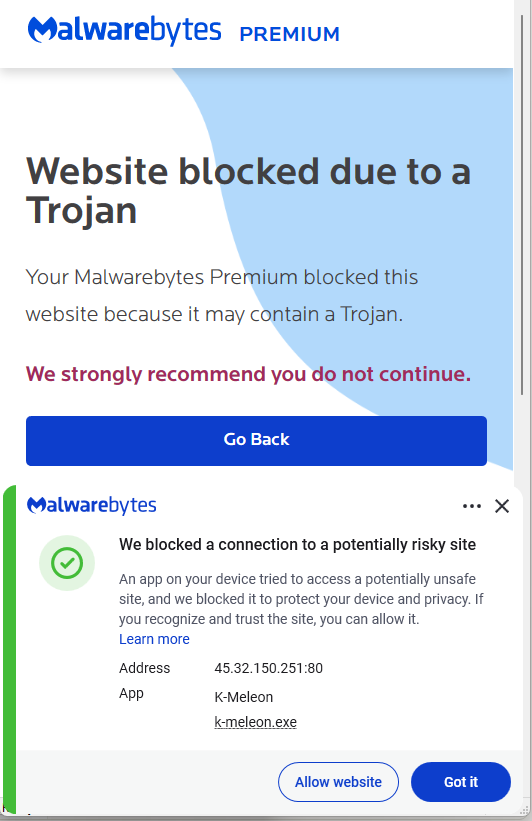
GlassWorm infiltrates developer ecosystems by distributing malicious or compromised npm/PyPI/VS Code packages that run hidden preinstall scripts to fingerprint systems and retrieve secondary payload locations from the Solana blockchain. After initial execution it deploys an infostealer, a Ledger/Trezor phishing binary, and a Node.js RAT that gains persistence, force‑installs a fake Chrome extension to monitor activity, and enables broader supply‑chain and credential‑based attacks. #GlassWorm #Solana
Keypoints
- GlassWorm is distributed via developer channels—malicious new packages or compromised maintainer accounts on npm, GitHub, PyPI, and VS Code extensions.
- Infection begins with a preinstall script or invisible Unicode loader that fingerprints the machine, skips Russian locales, waits, then queries the Solana blockchain memo field to locate stage two.
- The stage two payload is an infostealer targeting browser extension profiles, wallet apps, .txt/.image files containing seeds/keys, npm tokens, git credentials, VS Code secrets, and cloud credentials, exfiltrating data via POST requests.
- Stage three delivers a Ledger/Trezor phishing binary and a modular Node.js RAT (including browser credential stealers and a Chrome‑extension installer) and establishes persistence via scheduled tasks and Run registry keys.
- The RAT resolves C2 dynamically using a DHT lookup for a pinned public key and falls back to Solana if needed; the Chrome extension collects cookies, DOM trees, bookmarks, screenshots, keystrokes, clipboard data, and extensive history.
- Mitigations include pinning known‑good package versions, auditing sudden maintainer/ownership changes, regularly reviewing browser extensions, checking scheduled tasks and startup registry keys, and using up‑to‑date real‑time anti‑malware.
MITRE Techniques
- [T1195 ] Supply Chain Compromise – Use of compromised or malicious packages in npm/GitHub/PyPI/VS Code to gain initial access (‘distributed through developer channels…downloading malicious packages from code repositories like npm, GitHub, PyPI’)
- [T1059.007 ] Command and Scripting Interpreter: Node.js – Execution of package manager preinstall scripts or loaders to run code on the victim machine (‘a preinstall script or invisible Unicode loader runs and fingerprints the machine’)
- [T1082 ] System Information Discovery – Fingerprinting the host and checking locale to avoid execution in Russian locales (‘fingerprints the machine. If it finds a Russian locale, execution stops’)
- [T1105 ] Ingress Tool Transfer – Downloading stage two and stage three payloads (infostealer, phishing binary, RAT) after initial compromise (‘the script waits a few hours and then quietly contacts the Solana blockchain to discover where to fetch stage two of the infection’)
- [T1102 ] Web Service – Use of a public blockchain (Solana) memo field to store and retrieve payload locations or configuration (‘the attacker stores this information in the memo field of a Solana transaction’)
- [T1053.005 ] Scheduled Task/Job – Persistence via creating scheduled tasks that run malicious scripts (‘setting up scheduled tasks … so that the RAT comes back on every reboot’)
- [T1547.001 ] Boot or Logon Autostart Execution: Registry Run Keys/Startup Folder – Establishing persistence with Run registry keys (‘setting up … Run registry keys so that the RAT comes back on every reboot’)
- [T1041 ] Exfiltration Over C2 Channel – Stolen data (wallet seeds, credentials, tokens) is sent to a remote server via POST requests (‘After gathering this information, it sends it to a remote server via a POST request’)
- [T1555.003 ] Credentials from Web Browsers – Theft of browser‑stored credentials, cookies, localStorage, and extension profiles (‘targets browser extension profiles … steals cookies, localStorage’)
- [T1056 ] Input Capture – Keylogging and clipboard capture performed by the forced browser extension (‘it can also be used to take screenshots and act as a keylogger’ and ‘clipboard content’)
Indicators of Compromise
- [IP Address ] Stage‑2 payload delivery and RAT/WebSocket C2 – 45.32.150[.]251, 217.69.3[.]152, and 2 more IPs (217.69.0[.]159, 45.150.34[.]158)
- [Registry Key ] Persistence entries created under user Run keys – HKEY_CURRENT_USERSoftwareMicrosoftWindowsCurrentVersionRunUpdateApp, HKEY_CURRENT_USERSoftwareMicrosoftWindowsCurrentVersionRunUpdateLedger
- [Scheduled Task ] Malicious scheduled job – Name: UpdateApp which runs: AghzgY.ps1 (used to maintain persistence)
- [Browser Extension ] Force‑installed fake extension and directory names – Display name: Google Docs Offline (version 1.95.1); Windows extension directory name: jucku (macOS directory: myextension)
- [File Name ] Malicious script and payload filenames observed – AghzgY.ps1 (scheduled task target) and unnamed Ledger/Trezor phishing binary referenced in stage three