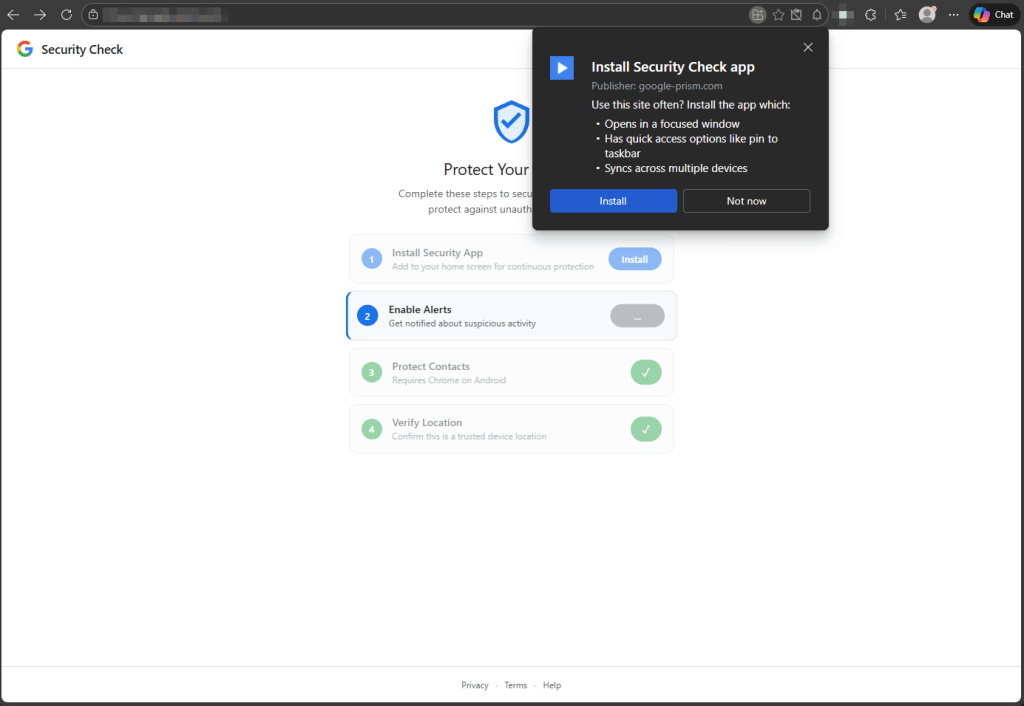
A phishing site impersonating a Google Account security page uses a Progressive Web App (PWA) and service worker to harvest contacts, push notifications, GPS, clipboard contents, intercept OTPs, scan local networks, and proxy traffic through the victim’s browser without a native app. If a victim follows all prompts the site also delivers an Android APK (sync.apk / com.device.sync) that installs a keylogging keyboard, notification and accessibility-based screen monitoring, and device-admin persistence; key indicators include the domain google-prism[.]com and SHA-256 1fe2be4582c4cbce8013c3506bc8b46f850c23937a564d17e5e170d6f60d8c08. #googleprism #comdevicesync
Keypoints
- A website spoofing a Google Account security check uses PWA installation to remove the address bar and appear as a native app, enabling stealthy persistent access via a registered service worker.
- The web layer requests and exfiltrates notification permissions, contact data via the Contact Picker API, precise GPS coordinates, and clipboard contents, and attempts SMS interception via the WebOTP API.
- The service worker provides a push-notification C2 channel, background and periodic sync handlers, offline queuing of stolen data in the Cache API, and replay of queued exfiltration when connectivity returns.
- A WebSocket relay lets the attacker proxy arbitrary HTTP requests through the victim’s browser and includes a browser-based port scanner to enumerate internal network hosts and ports.
- For victims who install the provided Android APK (sync.apk / com.device.sync), the native implant adds a keystroke-capturing keyboard, notification listener, accessibility-based screen observation, autofill interception, device-admin registration, boot persistence, and overlay capabilities.
- Removal guidance covers steps for Android, Windows/Chromium browsers, Firefox, and Safari, with emphasis on uninstalling the PWA, unregistering service workers, revoking notification/autofill permissions, and checking for the com.device.sync app and device-admin privileges.
MITRE Techniques
- [T1056 ] Input Capture (Keylogging) – The native APK installs a custom keyboard to capture keystrokes (‘a custom keyboard capable of capturing keystrokes’).
- [T1115 ] Clipboard Data – The page script attempts to read the clipboard on focus and visibility-change events to capture OTPs and wallet addresses (‘attempts to read the clipboard on focus and visibility-change events, looking for one-time passwords and cryptocurrency wallet addresses’).
- [T1071 ] Application Layer Protocols (WebSocket) – The toolkit uses a WebSocket relay as a C2 channel and to route attacker-specified web requests through the victim’s browser (‘the WebSocket relay… the malware acts as an HTTP proxy, executing fetch requests with whatever method, headers, credentials, and body the attacker specifies, then returns the full response including headers’).
- [T1090 ] Proxy – The attacker routes arbitrary traffic through the compromised browser to bypass IP-based controls and make internal resources reachable (‘the attacker can route arbitrary web requests through the victim’s browser as if they were browsing from the victim’s own network’).
- [T1046 ] Network Service Scanning – The web-based toolkit includes a port scanner that sweeps local subnet addresses and ports to identify live hosts (‘includes a port scanner that sweeps internal network ranges (by default, all 254 addresses on the local subnet across ports 80, 443, and 8080)’).
- [T1041 ] Exfiltration Over C2 Channel – Captured data is queued in the browser Cache API and replayed to the server via Background Sync or push-triggered uploads when connectivity returns (‘captured data… is queued in the browser’s Cache API… a Background Sync event replays every queued item to the server’).
- [T1105 ] Ingress Tool Transfer – The web layer delivers an Android APK download (presented as a “critical security update”) to install a native implant (‘the web layer delivers a second payload: an Android APK disguised as a “critical security update.”‘).
- [T1547 ] Boot or Logon Autostart Execution – The APK registers as a device administrator, sets a boot receiver, and schedules alarms to restart components for persistence (‘registers as a device administrator (which can complicate uninstallation), sets a boot receiver to execute on startup, and schedules alarms intended to restart components if terminated’).
Indicators of Compromise
- [File hash ] Android APK SHA-256 for the native implant – 1fe2be4582c4cbce8013c3506bc8b46f850c23937a564d17e5e170d6f60d8c08 (sync.apk).
- [Domain ] Command-and-control / distribution domain – google-prism[.]com (routes through Cloudflare CDN).
- [Package name ] Android package identifier – com.device.sync (APK labeled “System Service” when installed).
- [File name ] Delivered installer filename – sync.apk (described as “Version 2.1.0 · 2.3 MB · Verified by Google” on the download page).
- [App label / PWA name ] UI indicators on compromised devices – home screen PWA titled “Security Check” or an installed app labeled “System Service.”