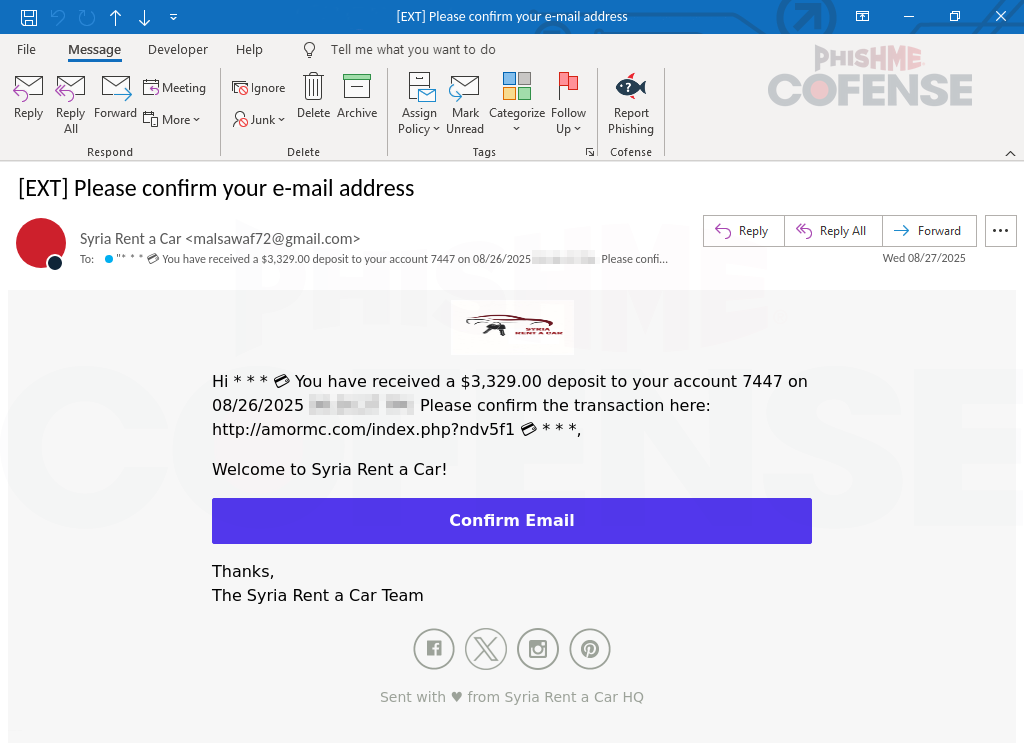
Cofense’s Phishing Defense Center discovered a campaign that impersonates Microsoft branding to push victims through a payment-lure email, fake CAPTCHA, and a faux “locked browser” experience that coerces users into calling a displayed fake Microsoft support number. The attack combines deceptive UI overlays and phone-based social engineering to harvest credentials or persuade victims to install remote-access tools. #SyriaRentACar #Cofense
Keypoints
- The campaign uses a payment-lure email purporting to be a reimbursement from “Syria Rent a Car” to entice clicks.
- Clicking the email link redirects victims to a fake CAPTCHA page to force engagement and evade automation.
- After CAPTCHA, victims are taken to a landing page that displays multiple Microsoft-themed pop-ups and simulates a locked browser.
- The simulated lock prevents normal mouse control and creates a faux ransomware panic; it can be bypassed by holding ESC.
- Victims are instructed to call a displayed “Microsoft Support” number where threat actors perform phone-based social engineering.
- Goal of the actors is credential theft or convincing victims to install remote desktop tools for full system access.
- Cofense recommends layered defenses, user awareness training, and use of Phishing Detection and Response to detect and remediate such threats.
MITRE Techniques
- [T1204] User Execution – The campaign uses a payment-lure email and fake CAPTCHA to trick users into clicking malicious links and continuing interaction (“payment lure…confirm your email address”, “fake CAPTCHA challenge where they are asked for human verification”).
- [T1110] Brute Force / Credential Access (social engineering) – Actors obtain credentials via social engineering on calls with fake support technicians after convincing victims the system is compromised (“when the victim calls the displayed number, they would be connected to a fake Microsoft support technician…asking the user to provide account credentials”).
- [T1133] External Remote Services – Threat actors attempt to persuade victims to install remote desktop tools to allow full access to their systems (“persuade the user to install remote desktop tools, allowing full access to their system”).
- [T1204.004] Malicious Link – The initial email contains links that redirect to a CAPTCHA and then to the malicious landing page to continue the attack chain (“Infection URL(s): hxxps://alphadogprinting[.]com/index.php?8jl9lzh…”).
- [T1586] Compromise Infrastructure – Use of multiple malicious payload and infection URLs and IPs to host landing pages and payloads (“Observed Payload URL(s): hxxps://my[.]toruftuiov[.]com/9397b37a-50c4-48c0-899d-f5e87a24088d … and payload IPs listed”).
Indicators of Compromise
- [URL ] Infection landing pages – hxxps://alphadogprinting[.]com/index.php?8jl9lzh, hxxp://amormc[.]com/index[.]php?ndv5f1h
- [URL ] Payload distribution hosts – hxxps://my[.]toruftuiov[.]com/9397b37a-50c4-48c0-899d-f5e87a24088d, hxxps://shilebatablurap[.]highbourg[.]my[.]id/win/index[.]php
- [IP ] Observed infrastructure IPs – 107[.]180[.]26[.]155, 184[.]168[.]97[.]153 (and multiple 104[.]21[.]x[.]1 addresses listed)
- [Domain ] Malicious domains used in redirects – alphadogprinting[.]com, amormc[.]com (and highbourg[.]my[.]id variants)
- [UI Artifact ] Fake Microsoft overlays and displayed support number – Microsoft-branded pop-ups and phone number shown on the locked-browser landing page (context: used to coerce victims into calling and performing social engineering).
Read more: https://cofense.com/blog/weaponized-trust-microsoft-s-logo-as-a-gateway-to-tech-support-scams