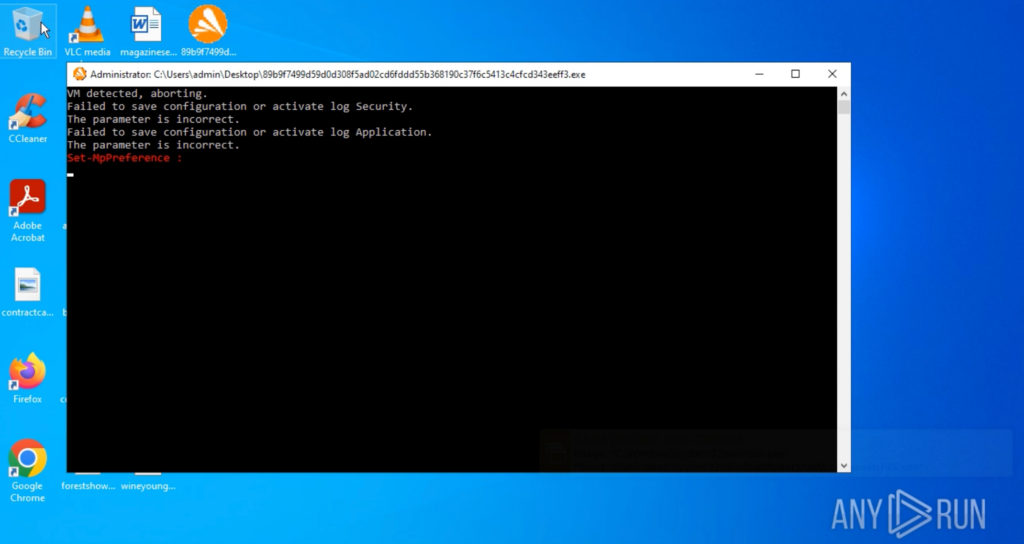
FunkLocker is a FunkSec ransomware strain showing signs of AI-assisted development (snippet-style coding) that leads to many inconsistent builds but predictable destructive behavior, including forceful termination of processes and local-only encryption using the .funksec extension. Avast Labs produced a decryptor after researchers found reused BTC wallets and locally derived or hardcoded keys; observed techniques include disabling defenses, deleting shadow copies, and abusing system tools. #FunkLocker #FunkSec
Keypoints
- FunkLocker displays “AI snippet” coding patterns indicating AI-assisted development, resulting in many builds with mixed stability and inconsistent quality.
- The ransomware forcefully terminates a long predefined list of processes and services (causing errors) to maximize disruption and facilitate encryption.
- Legitimate Windows tools (taskkill.exe, sc.exe, net.exe, PowerShell, vssadmin) are heavily abused to stop apps, disable defenses, and delete shadow copies.
- Encryption is performed locally without contacting C2 infrastructure; encrypted files receive the .funksec extension and the ransom note is dropped on the desktop.
- Operational security is weak: reused BTC wallets and locally derived or hardcoded keys enabled Avast Labs to build a public decryptor for FunkSec victims.
- FunkSec has been linked to 120–170 victims across sectors (government, defense, tech, finance, education) with confirmed incidents in the US, India, Spain, and Mongolia.
- ANY.RUN’s Interactive Sandbox can rapidly detonate samples, reveal execution chains and IOCs, and map observed TTPs to the MITRE ATT&CK matrix for fast response.
MITRE Techniques
- [T1036.005 ] Masquerading: Match Legitimate Resource Name or Location – The malware creates files with names similar to legitimate system files and drops them directly in the system drive root. Quote: ‘The malware creates files with names similar to legitimate system files and drops them directly in the system drive root.’
- [T1569.002 ] Service Execution: Service Commands – Launches sc.exe to manage Windows services (e.g., stopping them as part of its disruption routine). Quote: ‘Launches sc.exe to manage Windows services (e.g., stopping them as part of its disruption routine).’
- [T1007 ] System Service Discovery – Uses sc.exe to query or discover system services before acting on them. Quote: ‘Uses sc.exe to query or discover system services before acting on them.’
- [T1489 ] Impact: Service Stop – Executes taskkill.exe to forcefully terminate office apps, browsers (Chrome, Firefox, Edge) and other running processes. Quote: ‘Executes taskkill.exe to forcefully terminate: – Office apps – Running processes – Web browsers like Chrome, Firefox, Edge.’
- [T1059.001 ] Command and Scripting Interpreter: PowerShell – Runs multiple PowerShell commands to disable Windows Defender real-time protection and set ExecutionPolicy to Bypass for unrestricted execution. Quote: ‘Runs multiple PowerShell commands to: – Disable Windows Defender real-time protection – Change the execution policy to Bypass (allowing unrestricted script execution).’
- [T1135 ] Discovery: Network Share Discovery – Uses net.exe (and net1.exe) to display or manage information about current active network sessions. Quote: ‘Uses net.exe to display or manage information about current active sessions.’
- [T1490 ] Impact: Inhibit System Recovery – Deletes Volume Shadow Copies using vssadmin delete shadows /all /quiet to prevent recovery via system restore points. Quote: ‘Deletes Volume Shadow Copies using vssadmin delete shadows /all /quiet to prevent recovery via system restore points.’
- [T1562.001 ] Defense Evasion: Disable or Modify Tools – Modifies Windows Defender configuration and disables event logging to weaken or bypass protection mechanisms. Quote: ‘Modifies Windows Defender configuration to weaken or disable protection mechanisms.’
Indicators of Compromise
- [File Hash ] sample analyzed – c233aec7917cf34294c19dd60ff79a6e0fac5ed6f0cb57af98013c08201a7a1c
- [File Hash ] additional sample – e29d95bfb815be80075f0f8bef4fa690abcc461e31a7b3b73106bfcd5cd79033
- [File Path ] ransom note / dropped file – C:UsersadminDesktopREADME-ZasRvdSR44.md
- [Wallet ] observed BTC address context – wallet shown in ransom note with low-volume transactions (~$3,000 total) suggesting reuse across victims
Read more: https://any.run/cybersecurity-blog/cybersecurity-blog/funklocker-malware-analysis/