Auto-color is a stealthy Linux backdoor targeting government institutions and universities, designed for persistence and evasion by masquerading as a color-enhancement utility. Detection methods using the open source Wazuh platform, including Security Configuration Assessment and SysmonForLinux integration, are demonstrated to identify and alert on Auto-color malware activities. #Auto-color #Wazuh #SysmonForLinux
Keypoints
- Auto-color is a Linux backdoor used in cyberattacks primarily on government and academic targets in North America and Asia, disguising itself as a harmless utility for stealth.
- The malware requires manual execution with root privileges and achieves persistence by installing a malicious library (“libcext.so.2”) and modifying /etc/ld.preload.
- It hides command-and-control (C2) network connections by hooking system functions and filters TCP connection information to evade detection.
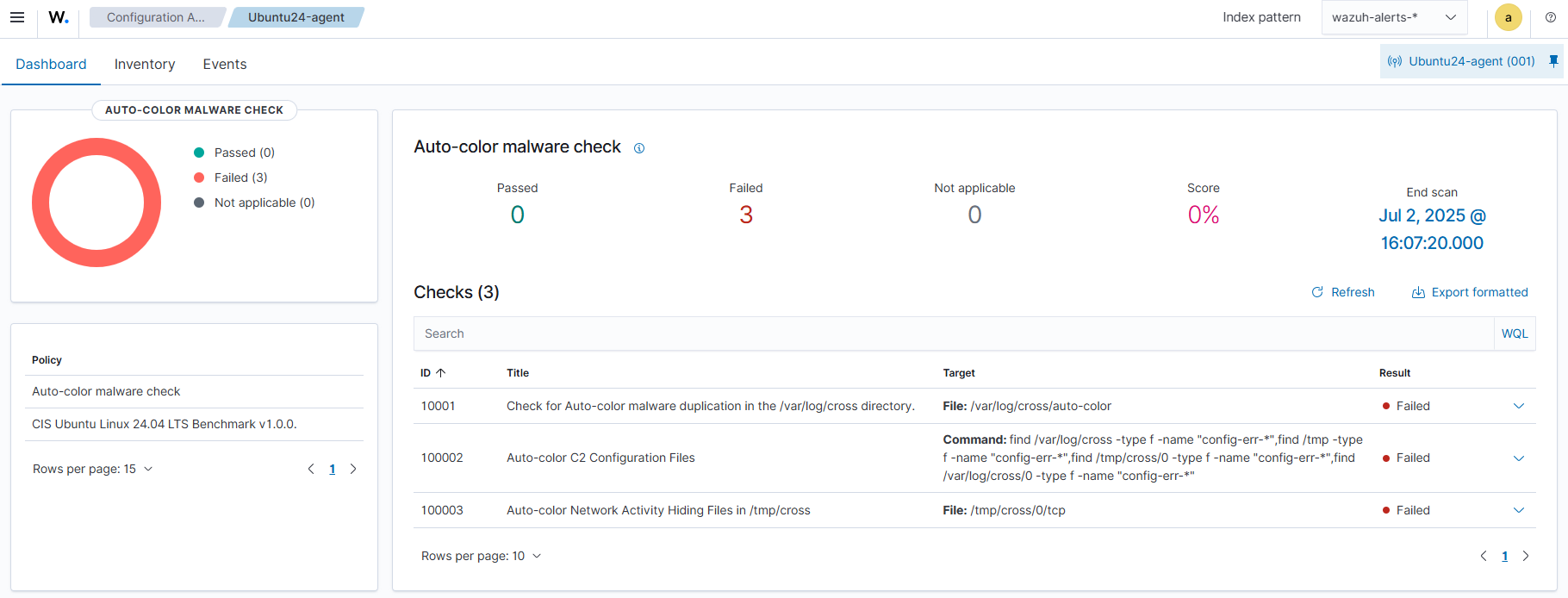
- Wazuh’s Security Configuration Assessment (SCA) can scan for suspicious files and directories related to Auto-color to detect infections.
- Integration of SysmonForLinux enriches endpoint logs, enabling custom Wazuh rules to detect malicious activities such as file creation, modification, deletion, and network manipulation.
- File Integrity Monitoring (FIM) with Wazuh can detect known Auto-color malware hashes via a constant database (CDB) list to alert on new infections.
- Detailed instructions for setting up Wazuh and SysmonForLinux for detection, including policy creation, rule configuration, and visualization of alerts on the Wazuh dashboard, are provided.
MITRE Techniques
- [T1036.005] Masquerading: Match Legitimate Name or Location – Auto-color duplicates itself as /var/log/cross/auto-color to appear legitimate (“Auto-color duplicates itself as “/var/log/cross/auto-color””).
- [T1059] Command and Scripting Interpreter – Auto-color executes arbitrary commands and maintains a reverse shell (“It opens a reverse shell, executes arbitrary commands…”).
- [T1574.006] Hijack Execution Flow: LD_PRELOAD Hijacking – Auto-color modifies /etc/ld.preload to load malicious libraries persistently (“…modifies the /etc/ld.preload file to achieve persistence…”).
- [T1546.015] Event Triggered Execution: Unix Shell Configuration Modification – Uses /etc/ld.so.preload modifications to load malicious code (“…created file /etc/ld.so.preload to load a malicious library for persistence…”).
- [T1098] Account Manipulation – Persistence via modification of system files to maintain malware presence (“…modifies /etc/ld.preload for persistence…”).
- [T1071.001] Application Layer Protocol: Web Protocols – Uses encrypted C2 communication files named config-err-* (“…files like config-err-XXXXXXXX for encrypted C2 communication”).
- [T1008] Fallback Channels – Auto-color creates config files and uses dynamic IP resolution for communications (“…connects to IP addresses that are generated dynamically…”).
- [T1568] Dynamic Resolution – Dynamically generates IP addresses for command and control servers (“…IP addresses are generated dynamically…”).
- [T1562.001] Impair Defenses: Disable or Modify Tools – Hooks libc functions to hide activities and disable detection (“…includes rootkit-like features by hooking libc functions”).
- [T1070.004] Indicator Removal on Host: File Deletion – Deletes infection traces, including files and logs (“It deletes infection traces to impede investigations…”).
- [T1204.002] User Execution: Malicious File – Requires manual execution of the malware on the victim Linux system (“requires manual execution by the victim on a Linux endpoint”).
Indicators of Compromise
- [File Hashes] Known Auto-color malware SHA256 hashes used for detection – 270fc72074c697ba5921f7b61a6128b968ca6ccbf8906645e796cfc3072d4c438, 815b74947d3a78a1b7d2aece43596ddc0ffc264e26092f1f9b6409c62e1437d6, and 5 more hashes.
- [File Names/Paths] Malware artifacts and configuration files – /var/log/cross/auto-color, /usr/lib/…/libcext.so.2, /etc/ld.preload, /var/log/cross/config-err-XXXXXXXX, /tmp/cross/
- [Directories] Presence of suspicious directories used by malware – /var/log/cross and /tmp/cross for malware duplication and network activity hiding.
Read more: https://wazuh.com/blog/detecting-auto-color-malware-with-wazuh/