Sysdig TRT found that Azure VM password reset telemetry can be evaded because VM extension names are caller-controlled, letting an attacker rename VMAccess deployments and reset credentials without triggering expected detections. Microsoft said this is not a security vulnerability, but the report shows the issue affects Azure VMAccess, Azure Portal, Azure CLI, and the Azure Threat Matrix guidance. #Azure #VMAccess #SysdigTRT #AzurePortal #AzureCLI #AzureThreatMatrix
Keypoints
- Sysdig TRT identified a flaw in Azure VM password reset detection tied to VM extension naming.
- Azure VM extension names are user-controlled, so attackers can choose arbitrary names that bypass name-based alerts.
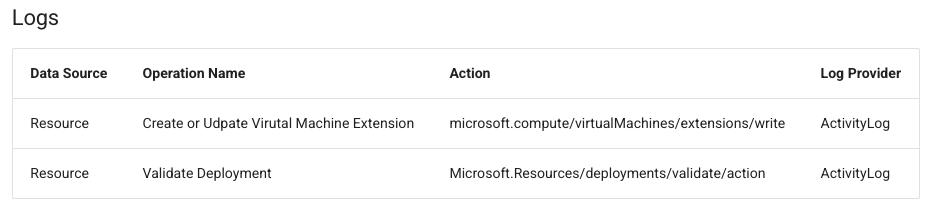
- The activity log records only the generic Microsoft.Compute/virtualMachines/extensions/write operation and the caller-controlled resource name, not the extension publisher or type.
- Microsoft’s Azure Threat Matrix guidance and related validation telemetry did not fire during Sysdig’s testing.
- Different Microsoft tools use different default VMAccess names, including enablevmAccess, VMAccessForLinux, and VMAccessAgent.
- Sysdig demonstrated a successful password reset using a custom extension name, my-custom-name-12345, with no detection alert.
- Recommended detection should rely on extension write operations, Azure Resource Graph, or the Extensions API rather than resource-name matching alone.
MITRE Techniques
- [T1036] Masquerading – The attacker can evade detection by giving the VM extension an arbitrary benign-looking name, making malicious password-reset activity blend in with normal operations (‘the extension resource name is an unvalidated, caller-controlled string’ and ‘name the extension anything; for example, AzureMonitorUpdate, compliance-check’).
Indicators of Compromise
- [Azure VM extension resource names] Suspicious caller-controlled names used in extension writes – my-custom-name-12345, AzureMonitorUpdate, and other arbitrary names
- [Azure operation names] Activity log and detection context – Microsoft.Compute/virtualMachines/extensions/write, Microsoft.Resources/deployments/validate/action
- [VMAccess extension names] Known default names used by Microsoft tools – enablevmAccess, VMAccessForLinux, VMAccessAgent
- [Azure resource paths] Extension deployment path pattern – /virtualMachines/{vm}/extensions/{name}